Need help?
Do you have a question about the UROVO DT50 and is the answer not in the manual?
Purpose, software version, chapter summaries, and sign conventions.
Relevant documents and service information.
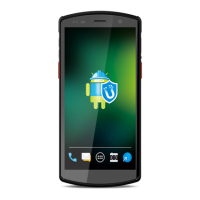
Unpacking the device and viewing its front panel.
Detailed views of the device's side and back panels.
Instructions for installing SIM and TF cards into the device.
Guide on installing and replacing the device battery.
Procedures for replacing TF/SIM cards and battery charging safety.
Procedures for charging the device via USB and desktop charger.
Methods to access settings and manage data usage.
How to remap physical keys for custom functions.
Configuring screen brightness, rotation, and wallpaper.
Adjusting sleep time and font size.
Adjusting audio volume and ringtones.
Viewing and managing the device's storage space.
Managing battery power and optimization tips.
How to manually set the device's date and time.
Viewing device information.
Procedures for updating the device's software.
Overview of the home screen interface and status bar indicators.
Operating the device via touchscreen and physical keys.
Details of system apps and how to access them.
Managing apps, restarting, and shutting down the device.
Factory reset and connecting the device to a PC.
Transferring files and photos using MTP and PTP protocols.
Device behavior in charging mode and safe PC disconnection.
Understanding scan engine decoding and configuring scanner settings.
Managing scanning modes, output, and barcode data formatting.
Configuring barcode symbologies and resetting scanner configurations.
Connecting to Wi-Fi and configuring mobile network settings.
Overview and steps for Bluetooth pairing, connection, and management.
Listing standard and optional accessories for the device.
General guidelines for device maintenance and cleaning procedures.
Solutions for common problems encountered with the device.
 General
| RAM | 4 GB |
|---|---|
| Storage | 64 GB |
| Battery Capacity | 4300 mAh |
| Operating System | Android 9.0 |
| Connectivity | 4G LTE, Wi-Fi, Bluetooth |
| Rugged Rating | IP67 |
| Scanning | 1D/2D barcode scanner |
| NFC | Yes |
| Display Size | 5.7 inches |
| Camera | 13 MP rear |
| Touch Panel | Capacitive |

 To Next Page