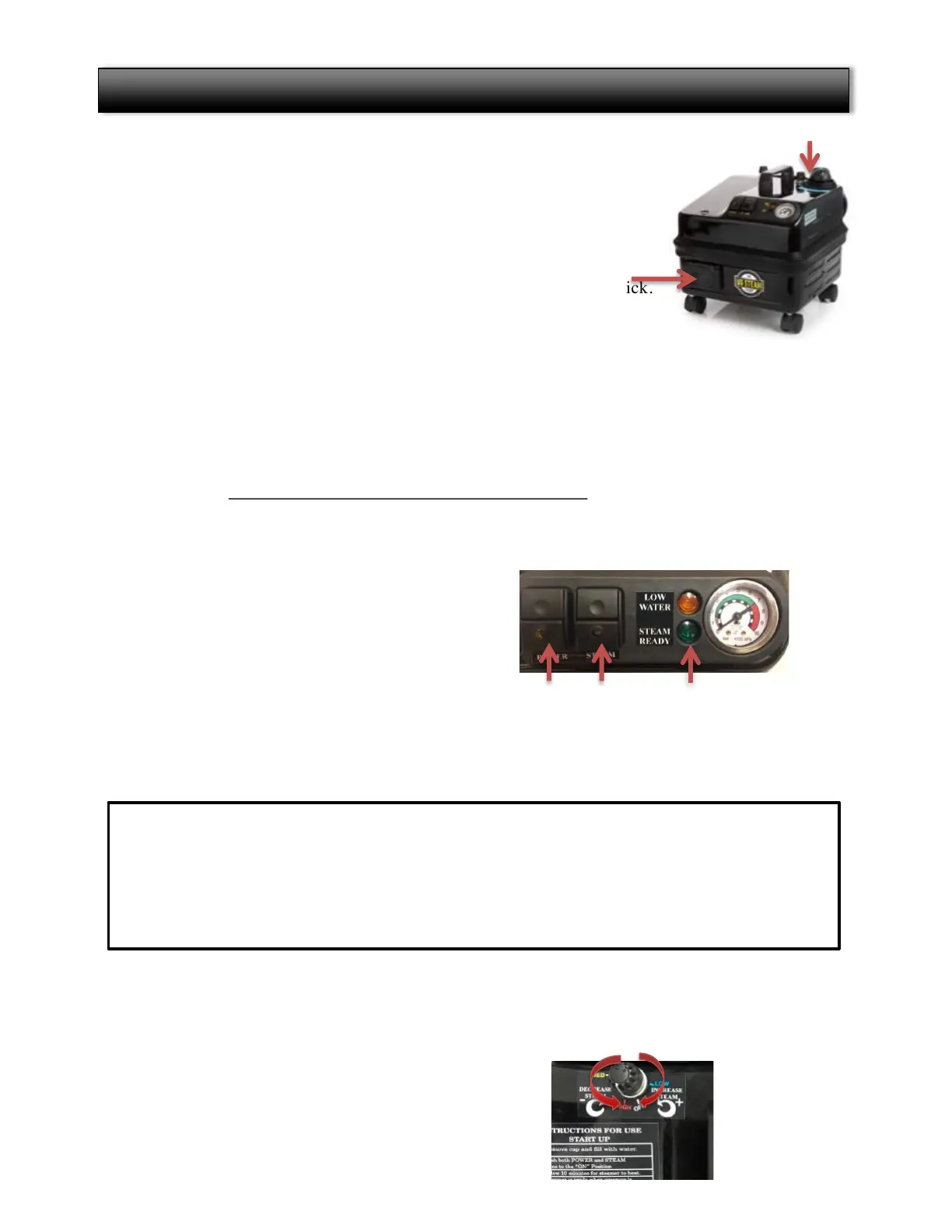
1) FILL TANK WITH WATER
Ø Remove the cap and pour tap water into the steamer.
Ø Do NOT put cleaning fluids in the steamer.
2) CONNECT HOSE
ØLift the socket cover on the front of the steam cleaner.
ØInsert the square end of the hose into the socket until you hear a click.
PLUG INTO ELECTRICAL OUTLET
ØPlug the power cord into an outlet.
ØThe steam cleaner should be the only appliance plugged into the outlet.
Ø
Use only a 12 gauge 15AMP extension cord with maximum length of 25ft.
4)POWER ON THE STEAM CLEANER
ØPress the POWER AND STEAM buttons.
ØIt will take
10 minutes before your steamer is ready to use
.
ØPressure gauge will read greater than 4.
5)BLEED THE HOSE BEFORE USING:
Ø Squeeze the gray trigger on the hose handle to shoot excess water from the hose into a towel
for about 10 seconds.
Ø Select Cleaning Attachment.
6)STEAM CONTROL DIAL is used to control the amount of steam released.
Ø
Increase
steam pressure by turning the dial counter-clockwise - toward the “+” sign on the dial
Ø
Decrease
the steam pressure by turning dial clockwise toward the “–” sign on the dial).
ØDo NOT turn the dial all the way clockwise. This is the lowest possible setting and no steam
will come out when pulling the trigger.
7) SHUT DOWN PROCEDURE
ØTurn off
Power
and
Steam
buttons.
Quick Start Guide
4
ON/OFF STEAM
READY
Tank Cap
During use, the
Steam Ready
light may blink indicating the boiler is heating.
LOW WATER ALERT & REFILLING
During start-up or use, the steamer may run low on water causing the orange light to blink and
the alarm to sound. The Eagle steamer has a separate fill tank so there is no cool down
requirements.
ØRemove cap, add water and restart the steamer by turning OFF and ON the Power and Steam
buttons.


 To Next Page