- 7 -
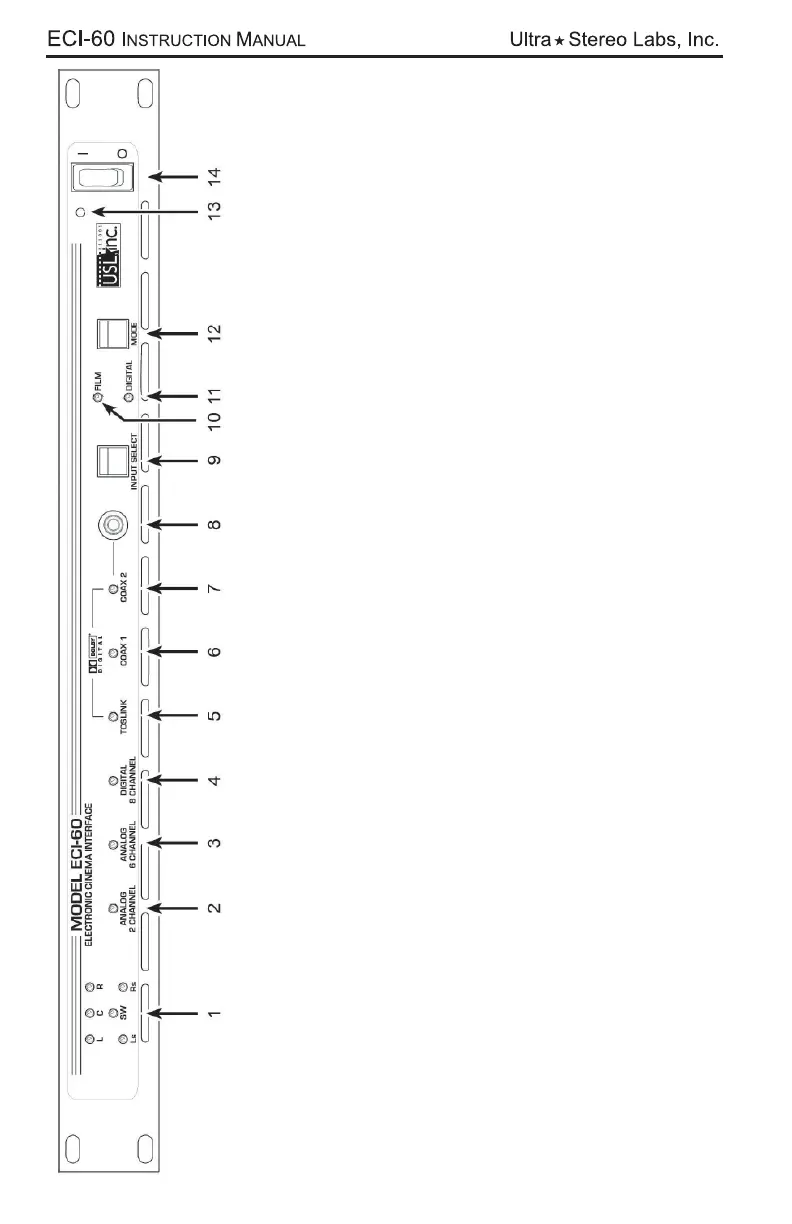
Signal presence indicators – Indicates when signals are greater than -30dB.
2 Channel Analog Indicator – Balanced line input. The 2 inputs are fed to a Pro Logic II decoder which produces a
6 channel output.
6 Channel Analog Indicator – Balanced line input. All channels (L, C, R, SW, Ls, Rs) are processed through the
unit.
8 Channel Digital Indicator – AES Balanced line input. The standard 6 channels are processed through the unit.
Two spare channels have independent balanced line outputs for use as needed.
Toslink Indicator – An optical fiber connection for SPDIF (PCM) or AC3 signals. Two channel PCM is decoded by
the Pro Logic II into 6 channels.
COAX 1 Indicator – Rear Panel RCA type connector for SPDIF (PCM) or AC3 signals. Two channel PCM is decoded
by the Pro Logic II into 6 channels.
COAX 2 Indicator – Front Panel RCA type connector for SPDIF (PCM) or AC3 signals. Two channel PCM is de-
coded by the Pro Logic II into 6 channels.
COAX 2 Input – RCA type connector for SPDIF (PCM) or AC3 signals.
Input Select switch (Front Panel) – Steps through the Input choices.
Film Mode Indicator – Lights when the unit is in Film (Bypass) Mode. Signals from Analog Bypass Input pass directly
through the unit.
Digital Mode Indicator – Lights when the unit is in the Digital Mode. Signals from the selected digital input (item #9)
are processed through the unit.
Mode switch – Selects between Film or Digital Modes.
Power Indicator – Lights when unit is powered on.
Power Switch – Applies power to the unit.
1.
2.
3.
4.
5.
6.
7.
8.
9.
10.
11.
12.
13.
14.


 To Next Page
 Loading...