
EasyManua.ls Logo

Usl JSD-80 - User Manual

Usl JSD-80
39 pages
Print Icon
To Next Page IconTo Next Page
Loading...
USL, Inc.
JSD-80 Instruction Manual
Page 1
3rd Edition. February, 2006
1. Introduction
....................................
3
1.1 Safety notice
1.2 Unpacking
1.4 Technical Specifi cations
1.5 Certifi cations
2. Installation
......................................
9
2.1 System Hardware Mounting
and Grounding
2.2 System Cooling and Ventila-
tion
3. Block Diagrams
............................
10
3.1 Audio Block Diagram
3.2 Two-Channel Analog Inputs
Block Diagram
3.3 Eight-Channel Input Block
Diagram
3. Control Block Diagram
4. System Modules
...........................
14
4.1 Input Module
4.2 Output Module
4.3 Control Module
5. Front Panel
....................................
15
5.1 Overview
5.2 Adjusting Format Levels
5.3 Adjusting Projector Gains
6. Back Panel
....................................
16
6.1 Rear Wiring Diagram
6.2 Back Panel Input Connec-
tions
6.3 Back Panel Signal Output
Connections
6.4 Other Back Panel Connec-
tions
7. JSD-80 Interface Software
............
19
7.1 Installation Procedure
7.2 Opening screen
7.3 Profi le Screen
7.4 Formats Screen
7.5 Inputs Screen
7.6 Equalizer Screen
7.7 Outputs Screen
7.8 Slit Eq Analyzer
7.9 Creating, Saving and Loading
Confi guration Files
8. “A” Chain Alignment
....................
23
8.1 Preparing the Soundhead
8.2 Alignment of Solar Cell and
Preamplifi er
8.3 Sum and Difference Mode
8.4 Mono EQ and Bypass Level
8.5 Optical Surround Gain and
Delay
8.6 Optical Subwoofer
8.7 Analog Non-Sync, Aux and
Mic levels
8.8 Digital Non-Sync, Digital Aux,
and Digital eight-channel
inputs
8.9 Digital Time Delays
9. “B” Chain Alignment
....................
29
9.1 Channel confi guration
9.2 Headroom settings
9.3 Main channels
9.4 Subwoofer channel
9.5 Saving Settings After Align-
ment
10. Other Options
..............................
33
10.1 Pre-set Format Levels
10.2 Startup Mode
10.3 Remote Fader
10.4 System Restore from Person-
ality Module
11. Trouble Shooting
.........................
35
12. Connector Pinouts
.......................
38
13. Installation Check List
.................
39
Table Of Contents
JSD-80
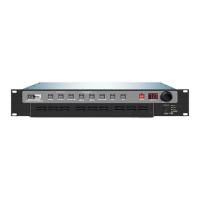
Cinema Sound Processor

Questions and Answers

  • K
    Kimberly GarciaAug 18, 2025
    What to do if Usl JSD-80 sound system does not work and +5 V and +/-12 V LEDs on the Front Panel are lit?
    • J
      Jessica SanchezAug 18, 2025
      If the +5 V and +/-12 V LEDs are lit but the Usl Recording Equipment sound system isn't working, ensure the amplifiers are operating and the volume controls are properly adjusted. If equipped, switch the change-over to the operating projector. Verify the Input Module's indicator LEDs are flickering, and if not, check the solar cell, wiring, and preamp. If the LEDs flicker, inspect the unit wiring, power amplifiers, or loudspeakers. Sound from the front speakers indicates a problem in the JSD unit; no sound suggests an issue elsewhere. Also, make sure the solar cell is illuminated and clean, using compressed air; do not use organic solvents or alcohol. Replace the bulb or repair the exciter supply.
  • T
    Tara BeanAug 21, 2025
    What to do if Usl Recording Equipment has buzzing sound in all channels, mainly the surrounds?
    • A
      Amy RodriguezAug 21, 2025
      If you're experiencing a buzzing sound in all channels, particularly in the surrounds, with your Usl Recording Equipment, it might be due to high frequency oscillation in the INPUT module. Check the Solar Cell wiring, ensuring the lines are not routed too close to the Power Amplifier or Loudspeaker wiring. Re-routing the cell lines might be necessary. If the problem persists, try removing the wires from the backboard and shorting the input. If this doesn't resolve the issue, consider replacing the Input module.
  • S
    scombsAug 23, 2025
    Why Usl JSD-80 Recording Equipment sound is distorted?
    • D
      Derrick KimAug 23, 2025
      If the sound from your Usl Recording Equipment is distorted, determine if the distortion is isolated to one channel or present in all channels. If it's in one channel, try exchanging power amplifiers or speaker lines to pinpoint the problem. Ascertain whether the distortion affects one or all formats. If MUSIC is clear, the issue lies within the input module or the SOLAR CELL alignment. Distortion solely in this mode suggests a problem in the input module. Ensure the correct lamp is used, as exciter lamps come in vertical and horizontal versions. Soundhead misalignment can also cause distortion.
  • H
    hannahvasquezAug 26, 2025
    How to fix hum in all channels of Usl Recording Equipment?
    • G
      Gregory ReevesAug 26, 2025
      To address hum in all channels of your Usl Recording Equipment, first, eliminate any stray light pickup at the solar cell on the projector. Also, eliminate causes of hum, such as ground loops, a bad exciter lamp supply, or the JSD unit being too close to a hum field from the power amplifier or other equipment. Check the wiring between the processor and power amplifiers.
  • W
    wilsonhollyAug 28, 2025
    What to do if Usl JSD-80 EXT 2 LED flashes?
    • J
      jennifermaxwellAug 28, 2025
      If the EXT 2 LED on your Usl Recording Equipment is flashing, it indicates a fault with the external device connected to EXT 2 or that no external device is connected. Check the wiring and functionality of the external AES-EBU device. The front LED will flash when the Word Clock is missing on the Left/Right channel pair.
  • C
    Chelsea LopezAug 30, 2025
    What to do if Usl JSD-80 Recording Equipment stereo mode dialog is leaking into the surrounds?
    • W
      wwardAug 30, 2025
      If, in stereo mode, dialog leaks into the surrounds on your Usl Recording Equipment, readjust the soundhead azimuth and reset preamp levels and high frequency boost with a test film. Ensure the soundhead guide rollers are not loose and have no end play, checking that the fixed side isn't loose. If equipped, ensure spring-loaded rollers function correctly. Also, verify that surround levels are not set too high and reset SPL levels accordingly.
  • E
    Eric MyersSep 1, 2025
    How to fix no sound in surround channel of Usl JSD-80?
    • D
      Deanna WestSep 1, 2025
      If there is no sound in the surround channel of your Usl Recording Equipment, replace the speaker fuse or main fuse. Try replacing the amplifier. Check the speakers and wiring. Speakers are often series-connected, so if one fails, they all will not work. If NON/SYNC MUSIC plays but the STEREO does not, there is a problem in the soundhead wiring.
  • S
    steven58Sep 4, 2025
    Why Usl JSD-80 stereo mode surrounds are extremely low?
    • W
      William WhiteSep 4, 2025
      If the surrounds are extremely low in stereo mode on your Usl Recording Equipment, the solar cell might be too far back. Move it to within .040” (1 mm) of the film and readjust.
  • H
    Helen Schroeder MDSep 6, 2025
    How to fix buzzing in Usl JSD-80 Recording Equipment system when connecting laptop?
    • F
      fergusondorothySep 6, 2025
      If you experience buzzing in the Usl Recording Equipment system when connecting a laptop, lift the power ground on the computer power pack or run the computer on battery power.
  • J
    Joshua SchaeferSep 8, 2025
    What to do if Usl Recording Equipment stereo mode has sound from left or right channel only?
    • L
      Lisa BaileySep 8, 2025
      If, in stereo mode, sound comes from only the left or right channel on your Usl Recording Equipment, and only the corresponding left or right LED indicator is lit with program material, check the projector wiring and input module.

Summary

Introduction

Safety Information and Standards

General safety precautions for product use and compliance with international safety standards.

Technical Specifications and Connections

Detailed technical specifications including signal connections, inputs, outputs, and audio paths.

Declaration of Conformance, CE

Lists CE compliance, certifications, and equipment classification details.

Installation

System Hardware Mounting and Grounding

Guidelines for rack mounting, grounding, and physical installation of the unit.

System Modules

Back Panel

JSD-80 Interface Software

7.1 Installation Procedure

Instructions for installing the JSD-80 interface software on a computer.

7.5 Inputs Screen

Controls for preamp, matrix, EQ, and analyzer setup.

7.8 Slit EQ Analyzer Screen

Real-time analyzer for assessing audio frequency response.

7.6 Equalizer Screen

Screen for adjusting auditorium equalization settings.

“A” Chain Alignment

8.1 Preparing The Sound Head

Steps to prepare the projector sound head for alignment procedures.

8.2 Alignment of Solar Cell and Preamplifier

Procedure for aligning the solar cell and preamp with the film.

“B” Chain Alignment

9.4 Subwoofer Channel

Setting up and equalizing the subwoofer channel for optimal bass response.

9.3 Main Channels

Aligning main channels including left, center, and right speakers.

Other Options

10.4 System Restore

Procedure for restoring system settings in case of failure.

Trouble Shooting

System Not Working (No LEDs)

Troubleshooting steps when the system is not working and no front panel LEDs are lit.

Distorted Sound

Steps to diagnose and resolve audio distortion issues.

System Not Working (LEDs Lit)

Troubleshooting steps when the system is not working but LEDs are lit.

No Sound in Front Channels

Diagnosing issues when one or more front channels have no sound.

No Sound in Surround Channel

Troubleshooting steps for a missing surround channel.

Installation Check List

B Chain Alignment Checklist

Checklist for performing B Chain audio alignment procedures.

Usl JSD-80 Specifications

General IconGeneral
BrandUsl
ModelJSD-80
CategoryRecording Equipment
LanguageEnglish

Related product manuals