JSD-80 Instruction Manual
3rd Edition. February, 2006
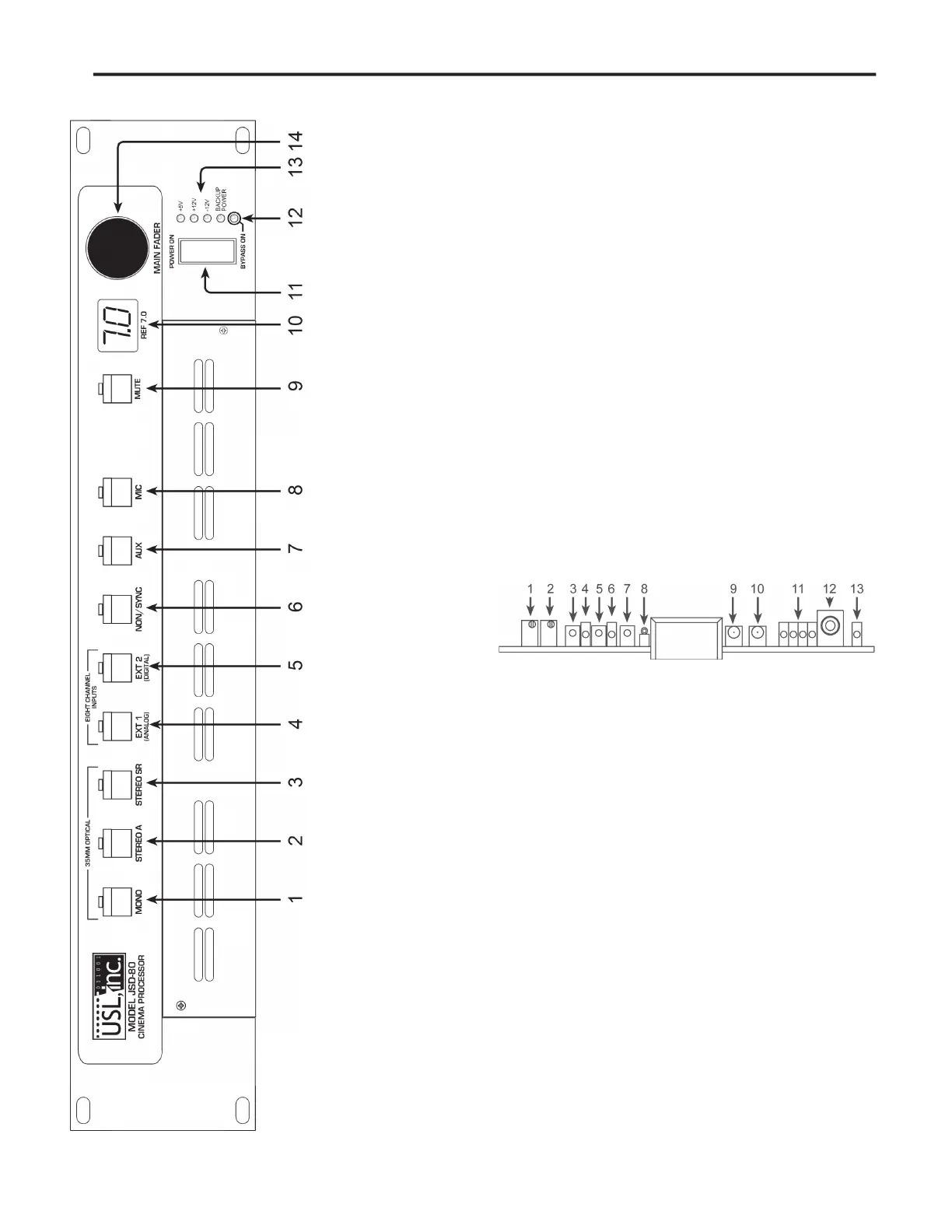
The front panel allows the operator to manually
select formats and adjust the main fader. An LED
numerical readout indicates fader level. Status
LEDs indicate presence of power supplies. The
unit is placed into the bypass mode by turning
off the main power switch. A removable panel
allows access to service or replace modules.
5.2 Adjusting Format Levels
Each format has a preset level. These presets
can be set with a laptop or directly on the front
panel. Pressing and holding the appropriate
format button and rotating the main fader will
change the preset level for that format. The LED
display will indicate the preset level number.
5.3 Adjusting Projector Gains
1. Turn off the processor.
2. Hold down the “Mute” button and turn
3. Continue to hold the “Mute” button
until the LED display indicates 1.1 which
means Projector 1, Left channel.
4. Run a Cat 69T tone loop on the projector.
5. Watch the LED level indication on the
6. If the left indicator (9) is red, the signal
is too low. Rotate the main fader control
clockwise to raise the level. When the
level is correct, the indicator (9) will
turn green. A fl ashing red means that the
7. When the left indicator is green, press
the “Mute” button to signal OK. The dis-
play will change to 1.2 (Projector 1, Right
Channel). Adjust the main fader until the
right (10) indicator turns green. Press
“Mute.” The optimum setting is fi rst click
from solid red to solid green.
8. The LED display will show 2.1 (Projec-
tor 2, Left Channel). Press “Mute” when
adjustment is complete. If there is no
Projector 2, press “Mute” twice to return
to normal operation. If there is a Projec-
tor 2, press “Mute” once and proceed to
9. The LED display will show 2.2 (Projector
2, Right Channel). Press “Mute” when the
10. The last “Mute” button press will return
the system to its normal operating mode.
Operation will resume after six seconds.
1. Mono signal from 35mm analog sound track
2. Stereo signal with “A” type noise reduction from 35mm
3. Stereo signal with “SR” type noise reduction from 35mm
4. Ext. 1: Eight-channel analog input
5. Ext. 2: Eight-channel AES/EBU digital input
6. Non/Sync: Two-channel input with fade in, fade out
7. Aux: Two-channel input
8. Mic: for paging purposes
9. Mute: globally mutes all outputs
10. Level Indicator: also used for setting projector gains
11. Power Switch: when off, unit goes into bypass mode.
12. Bypass LED: indicates Bypass is active.
13. Power LEDs: indicates status of all internal supplies.
14. Main Fader Control: also used for setting projector gains.


 To Next Page