
 Need help?
Do you have a question about the UTECH Smart Venus and is the answer not in the manual?
Adjusts mouse cursor sensitivity based on movement speed.
Controls the speed at which the mouse cursor moves across the screen.
Adjusts the scrolling speed of the mouse wheel for navigation.
Sets the interval required for registering a double-click action.
Allows saving and loading custom mouse settings and configurations.
Determines how frequently the mouse reports its position to the computer.
Enables saving current configurations to a file or restoring defaults.
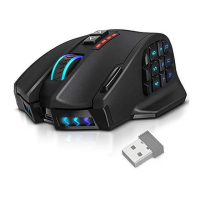
The UtechSmart Venus MMO Gaming Mouse is a high-precision gaming peripheral designed to enhance the experience of Massively Multiplayer Online (MMO) games. It is engineered to provide gamers with advanced control, comfort, and customization options, allowing for a more immersive and effective gameplay experience. The mouse is specifically tailored to meet the demands of next-generation MMO titles, offering features that support rapid in-game actuations and sustained performance during extended play sessions.
One of the primary functions of this gaming mouse is to offer extensive programmability, which is crucial for MMO games that often require quick access to numerous spells, abilities, and macros. The Venus mouse features 12 mechanical thumb grid buttons, strategically placed for easy access and designed to provide assured tactile feedback. This design allows players to execute commands swiftly and accurately without needing to look away from the screen, thereby maintaining focus on the game. The improved button design facilitates "blind-find" operation, meaning users can locate and activate buttons by touch alone, relying on muscle memory and instinct to lead them to victory. This capability is invaluable for harassing enemies, farming end-bosses, and generally performing complex actions with greater efficiency.
The ergonomic design of the UtechSmart Venus mouse is a significant aspect of its functionality, aimed at minimizing fatigue during prolonged gaming sessions. Whether playing at home or competing in tournaments, the mouse's shape and surface materials are chosen to ensure comfort and a firm grip. It features an ergonomic right-handed design with a rubber painting surface, which helps maintain a secure hold even during intense gameplay. The durable smooth TEFLON feet pads contribute to ultimate gaming control by allowing the mouse to glide effortlessly across surfaces, reducing friction and enabling precise movements.
Customization is a core feature of the UtechSmart Venus MMO Gaming Mouse. It includes an adjustable weight system, allowing users to fine-tune the mouse's feel to their personal preference. This system comes with an 8-piece weight tuning set, each weighing 2.4g, enabling gamers to achieve a custom fit that matches their unique play style. The weight instruction guides users on how to select desired weights, slide the mouse cover back, and insert them into the designated slot, emphasizing careful placement to avoid gaps near the cover's side hinge.
Beyond physical customization, the mouse offers extensive software-based configuration options. After installing the necessary driver, users can access a range of features to personalize their gaming experience. The "Macro Manager" is a powerful tool that allows users to record and assign keyboard actions to mouse buttons. This function is essential for creating complex sequences of commands that can be triggered with a single click, streamlining gameplay and providing a competitive edge. Users can create new macros, modify existing ones, and manage delays between actions, as well as set the number of loops for repetitive tasks. The "Action EditTool" provides options to record after, delete, move up/down, copy, cut, paste, and add mouse actions, offering comprehensive control over macro creation.
The mouse's DPI (Dots Per Inch) sensitivity is highly adjustable, catering to different game types and personal preferences. While it comes with five default DPI settings (1000, 2000, 4000, 8200, and 16400DPI), users can fine-tune the DPI anywhere from 50 to 16400 DPI. The option to "Constrain to XY" can be canceled to individually adjust the XY sensitivity levels, providing even greater precision.
Lighting options add another layer of personalization to the UtechSmart Venus mouse. Users can select the color of their preference for the UtechSmart logo atop the mouse, choosing from over 16 million LED color options. The LED lighting can also be disabled if preferred. Additionally, the mouse features a mode indicator light with five distinct colors (Yellow-mode 1, Green-mode 2, Blue-mode 3, Purple-mode 4, Red-mode 5) to quickly identify which of the five savable memory profiles is currently active. Users can also adjust the light brightness level and breathing speed, further customizing the aesthetic to match their setup or mood.
The software also allows for adjustments to various mouse performance parameters. "Acceleration" controls how sensitive the cursor is when the mouse is moved, with higher acceleration leading to greater sensitivity. "Mouse point speed" adjusts the cursor's speed, while "Mouse scroll speed" controls the scrolling speed of the mouse wheel. "Mouse double-click speed" allows users to set the required interval for a double-click to register, with shorter intervals making double-clicks faster.
"Profiles" are a key feature for managing different game settings. Users can change the currently active profile, with each profile designed to record a group of settings. This enables quick switching between configurations optimized for different games or tasks. The "Polling rate" setting determines how frequently the mouse transfers information to the computer, with options ranging from 125Hz (8ms) to 1000Hz (1ms). A higher polling rate results in more precise mouse movements, which is critical for competitive gaming.
For managing configurations, the "Save/Load setting" feature is invaluable. Users can "Save as" their current configurations to a file, "Load file" to retrieve previously saved settings, or "Restore" to reset the mouse to its factory default settings. This ensures that custom settings are not lost and can be easily managed.
Installation of the UtechSmart Venus mouse is straightforward: plug the mouse into a USB port, run the installation software, follow onscreen instructions, and visit the UtechSmart website for the latest drivers. The device is compatible with Windows XP, Vista, 7, and 8, and requires 20MB of free hard disk space.
Maintenance and support are also addressed. The company provides an 18-month warranty from the date of purchase. For inquiries or comments, customers can contact support via email. For quality-related issues, a replacement or refund can be requested through a support form on the UtechSmart website. It's important to note that after-sales service is primarily for purchases made directly from UtechSmart; for purchases through other retailers, customers are advised to contact the retailer for exchange or refund requests.
Environmentally conscious design is also a consideration. The product documentation includes a "Chemical Component" statement, indicating that the products do not contain toxic or harmful substances and are environment-friendly, meaning they can be recycled. This commitment to sustainability reflects a broader responsibility beyond just gaming performance.
In summary, the UtechSmart Venus MMO Gaming Mouse is a comprehensive gaming peripheral designed to offer precision, customization, and comfort for MMO players. Its extensive programmable buttons, adjustable weight system, customizable lighting, and advanced software features collectively aim to provide a superior gaming experience, allowing players to focus on strategy and execution without being hindered by their hardware.
 General
| DPI | 16400 |
|---|---|
| Connection Type | Wired |
| Connectivity Technology | USB |
| Sensor | Laser |
| Color | Black |
| Weight | 150g |
| Cable Length | 1.8m |
| Polling Rate | 125-1000Hz |
| Buttons | 18 programmable buttons |

 To Next Page