
 Need help?
Do you have a question about the UTEK ULTRALOQ and is the answer not in the manual?
Watch step-by-step installation video via QR code or website.
Watch step-by-step user guide video via QR code or website.
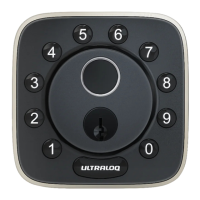
Detailed explanation of the lock's exterior components and features.
Description of the external parts like indicators, keypad, and button.
Description of the internal parts like battery cover, turn knob, and reset button.
Information about low battery alerts and replacement.
Methods to unlock the lock from the exterior using code, fingerprint, or smartphone.
How to manually lock the door from the outside.
Method to unlock the door from the interior using the turn knob.
Instructions for resetting the lock to factory default settings.
Guidance on replacing the lock's batteries.
How to activate or deactivate the auto-lock feature.
Explanation of the Vague Code feature for enhanced security.
Tips for optimal fingerprint recognition and placement.
Steps to create an Admin Code without using the app.
Steps to add a User Code without using the app.
Steps to add a fingerprint without using the app.
Instructions for deleting users and admin codes in standalone mode.
Procedures for resetting the lock to factory default.
Steps to take if a paired smartphone is lost.
Methods to unlock the lock when the battery is dead.
Explanation of user roles and their privileges.
Compatibility with third-party accessories.
Information on the maximum number of logs the lock can store.
Information on the maximum number of users and fingerprints supported.
Tips to prolong the battery life of the smart lock.
Clarification on the need for an additional bridge for connectivity.
Details on the Wi-Fi network requirements for the lock.

 To Next Page
 General