EasyManua.ls Logo

v.link CI-VL7-MGU - User Manual

Default Icon
18 pages
Print Icon
To Next Page IconTo Next Page
Loading...
Version 12.11.2020 HW: 1.3 CI-VL7-MGU
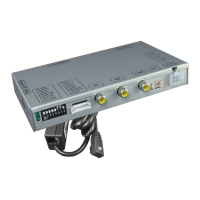
v.LiNK Video inserter
CI-VL7-MGU
Compatible with
BMW vehicles F-and G-series
with MGU and 10.25inch or 12.3inch monitor and HSD+2 connector
Video-inserter for one rear-view camera, one front camera
and one additional video source
Product features
Video-inserter for factory-infotainment systems
CVBS Input for one rear-view camera
CVBS Input for one front camera
1 CVBS Video-input for after-market Video sources (e.g. USB-Player, DVB-T2 Tuner)
Automatic switching to rear-view camera input on engagement of the reverse gear
Automatic front camera switching after disengaging reverse gear for 10 seconds
Dynamic parking guide lines for rear-view camera (not available for all vehicles)
Video-in-motion (ONLY for connected video-sources)
Video-inputs NTSC compatible
Question and Answer IconNeed help?

Do you have a question about the v.link CI-VL7-MGU and is the answer not in the manual?

Summary

Pre-Installation Steps

Package Contents

Lists the items included in the package.

Vehicle and Accessory Compatibility

Verifies vehicle and accessory compatibility before installation.

Connector Identification

Details the interface's input/output connectors and their functions.

Dip Switch Settings and Functions

Explains the function and configuration of the 8 dip switches.

Vehicle Integration and Installation

Physical Installation Location

Specifies the recommended location for installing the interface within the vehicle.

Wiring Connection Diagram

Provides a visual diagram of how to connect the interface to the vehicle.

Quadlock;CAN Harness Connection

Details the connection process for the Quadlock/CAN connector.

Connecting Video Sources

Explains how to connect aftermarket video sources like cameras.

Dynamic Guide Line Adjustment

Guides on how to adjust dynamic parking guide lines.

Interface Usage and Control

Manual Video Source Switching

Describes how to manually switch to an aftermarket video source using the i-Drive button.

Technical Specifications Overview

Device Specifications

Lists the technical details, power requirements, and dimensions of the interface.

v.link CI-VL7-MGU Specifications

General IconGeneral
Brandv.link
ModelCI-VL7-MGU
CategoryAutomobile Accessories
LanguageEnglish

Related product manuals