EasyManua.ls Logo

V-TAC ESS Series - User Manual

V-TAC ESS Series
33 pages
Print Icon
To Next Page IconTo Next Page
Loading...
INSTRUCTION MANUAL
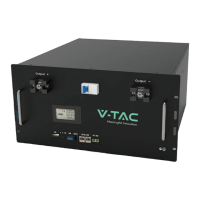
ESS SERIES BATTERY PACK
IN CASE OF ANY QUERY/ISSUE WITH THE PRODUCT, PLEASE REACH OUT TO US AT: SUPPORT@V-TAC.EU
FOR MORE PRODUCTS RANGE, INQUIRY PLEASE CONTACT OUR DISTRIBUTOR OR NEAREST
DEALERS. V-TAC EUROPE LTD. BULGARIA, PLOVDIV 4000, BUL.L.KARAVELOW 9B
Thank you for selecting and buying V-TAC Product. V-TAC will serve you
the best. Please read these instructions carefully & keep this user manual
handy for future reference. If you have any another query, please contact
our dealer or local vendor from whom you have purchased the product.
They are trained and ready to serve you at the best.
INTRODUCTION
Multi-Language Manual QR CODE
Please scan the QR code to access the manual
in multiple languages.

Other manuals for V-TAC ESS Series

Questions and Answers

  • T
    taylorjoshuaSep 9, 2025
    What causes low cell voltage in V-TAC ESS Battery Pack?
    • C
      Cristian HarrisSep 9, 2025
      If your V-TAC Battery Pack has a low cell voltage, it could be because the battery pack hasn't been maintained for a long time, so use an equalizer to maintain it. Another cause may be a damaged single battery that you should replace. Inaccurate voltage sampling can also cause this, so replace the electrical sampling line or replace the BMS.
  • R
    Robert SummersAug 23, 2025
    Why is the indicator on my V-TAC Camera Accessories not flashing?
    • J
      jhoganAug 23, 2025
      If the indicator on your V-TAC Camera Accessories isn't flashing, here are a few things to check: * Ensure the power cable of the battery pack is securely connected; if not, reconnect it. * Verify that the power switch is turned on. * The BMS might be in a sleep state, requiring you to charge the battery pack. * In some cases, the BMS might be damaged and will need replacement.
  • M
    montgomeryjefferyAug 25, 2025
    What to do if my V-TAC Camera Accessories are unable to discharge?
    • L
      Lisa HarperAug 25, 2025
      If your V-TAC Camera Accessories are not discharging, it could be due to several reasons. Check the battery pack wiring terminals for damage and replace them if necessary. Another potential cause is a BMS communication failure; try reconnecting the communication line between the BMS and the battery pack, and replace the cable if it's damaged. Also, ensure the power switch is turned on.
  • P
    Paul HarrisAug 27, 2025
    Why is the voltage display inaccurate on my V-TAC Camera Accessories?
    • H
      hnunezAug 27, 2025
      If you're experiencing inaccurate voltage display with your V-TAC Camera Accessories, it might be due to a damaged voltage sampling line, which would require replacing the voltage sampling cable. Alternatively, the BMS itself could be damaged and need replacement.
  • D
    Debra JamesAug 27, 2025
    How to fix communication failure with V-TAC Camera Accessories?
    • J
      Jacqueline Williams PhDAug 27, 2025
      Communication failure in your V-TAC Camera Accessories can stem from a few causes. First, ensure that the power switch is turned on. If it is, the BMS might be in a sleep status, requiring you to charge the battery pack. Finally, a damaged communication cable can also cause this issue, so replace the network cable.
  • B
    Brandy GallagherAug 29, 2025
    Why do my V-TAC Camera Accessories have low capacity?
    • A
      Angela CarterAug 29, 2025
      If your V-TAC Camera Accessories are showing low capacity, it could be because the battery pack hasn't been maintained for a long time; using an equalizer to maintain the battery pack can help. Another reason could be a damaged single battery, which would need to be replaced. Inaccurate voltage sampling could also be the cause, requiring replacement of the electrical sampling line or the BMS.
  • K
    Kristen ReeseSep 18, 2025
    How to fix inaccurate voltage display on V-TAC ESS Battery Pack?
    • J
      Jennifer VargasSep 18, 2025
      If the voltage display on your V-TAC Battery Pack is inaccurate, it could be due to a damaged voltage sampling line, which would require replacing the voltage sampling cable. Alternatively, the BMS might be damaged and need replacement.
  • I
    ingramjustinSep 22, 2025
    What causes low cell voltage in my V-TAC ESS?
    • M
      matthewhughesSep 22, 2025
      Low cell voltage in your V-TAC Battery Pack can stem from a few issues. If the battery pack hasn't been maintained for a long time, using an equalizer might help. A damaged single battery can also cause this, requiring replacement. Another potential cause is inaccurate voltage sampling, which can be resolved by replacing the electrical sampling line or the BMS.
  • R
    richard23Sep 8, 2025
    Why is the voltage display inaccurate on my V-TAC Battery Pack?
    • K
      Kelly RodriguezSep 8, 2025
      If your V-TAC Battery Pack displays an inaccurate voltage, it could be due to a damaged voltage sampling line, which would need to be replaced. Alternatively, the BMS itself might be damaged and require replacement.
  • C
    Chelsea ThomasSep 4, 2025
    What to do if my V-TAC ESS Battery Pack is unable to discharge?
    • S
      sarahdiazSep 4, 2025
      If your V-TAC Battery Pack is not discharging, it might be due to a few reasons. Check if the power switch is turned on. Damaged battery pack wiring terminals could also be the cause, requiring replacement. Additionally, a BMS communication failure could be the issue, so try reconnecting the communication line between the BMS and the battery pack.

Summary

Introduction to V-TAC ESS Battery Pack

Document Information

Intended Audience

Defines the target readers for this instruction manual.

Symbol Conventions

Explains the meaning of symbols used throughout the document.

Product Overview

Product Application

Describes the RESS's intended uses and key features.

Product Composition

Details the main components that constitute the RESS.

Battery Cabinet and System Specs

Battery Cabinet Appearance and Dimensions

Details the appearance and dimensions of the battery cabinet.

Battery System Technical Specifications

Provides comprehensive technical specifications for the entire battery system.

Battery Components

Lithium-ion Cell Details

Covers cell appearance, technical specifications, and key features.

Battery Module Details

Explains module structure, appearance, operation panel, PIN definition, and technical specifications.

Battery Cluster Configuration

Illustrates the composition and provides schematic diagrams of battery clusters.

Control and Management Systems

High-Voltage Box Details

Details the HV box appearance, operation panel, PIN definition, and technical specifications.

Battery Management System (BMS)

Introduces the BMS architecture and details its components: BMU, BCU, and PCU.

Installation Guide

Installation Precautions

Lists essential safety and procedural precautions for installation.

Preparation for Installation

Covers necessary tools and packing list for installation.

Installing Battery Cabinet

Step-by-step guide for installing the battery cabinet.

Installing Battery Modules

Procedure for installing battery modules into the cabinet.

Connecting Power and Signal Cables

Guides on connecting power and signal cables to the RESS.

Operation Guide

Pre-Power-on Checks

Outlines essential checks before powering on the RESS.

Power-on Procedure

Provides the step-by-step procedure for safely powering on the RESS.

System Operation

Describes automatic operation after power-on and inverter settings.

Routing Maintenance

Battery Storage Guidelines

Recommends storage conditions and periodic charging requirements.

Maintenance Schedule

Outlines monthly, quarterly, and yearly maintenance tasks.

Acronyms and Abbreviations

V-TAC ESS Series Specifications

General IconGeneral
ModelESS Series
CategoryBattery Pack
Nominal Voltage51.2V
Operating Voltage Range44.8V - 57.6V
Nominal Capacity100Ah
Energy5.12 kWh
Cycle Life6000 Cycles @ 80% DOD
CommunicationCAN/RS485
ScalabilityUp to 16 units in parallel
CertificationCE, UN38.3
ProtectionOvercurrent, Short circuit

Related product manuals