CONNECTIONS
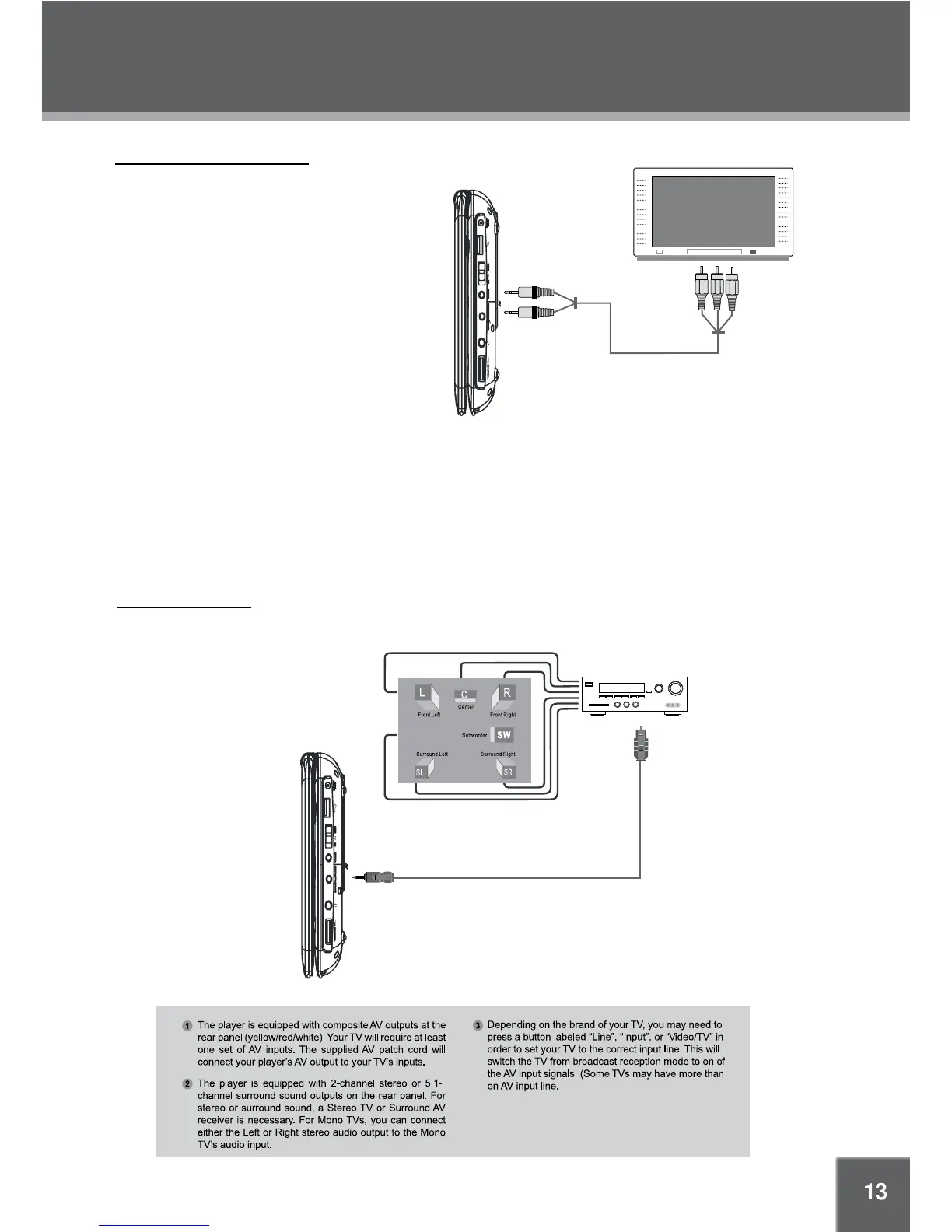
AV Out - Output the AV Signal
a). Connect the player to TV or the
moniter by the RCA cable.
b). Set the AV-IN / DVD switch to DVD.
AV IN - Input the AV Signal
a). Connect the player to the external
input source by the RCA cable.
b). Set the AV-IN / DVD switch to AV-IN.
External Monitor wth AV input
To AUDIO/
VIDEO
To VIDEO
To AUDIO
Audio/Video cable
NOTE: 1. Refer to the owner’s manual of your TV as well.
2. B
3. To resume normal playback on the DVD player select DVD on the
AV-IN / DVD switch on the side of the player.
efore connecting the DVD player to a TV set, be sure to turn the
power off and unplug both units from the wall outlet.
Audio Connections
Amplifier equipped with a Dolby
Pro Logic Surround
Optical Cable
Optical/Audio Jack
Audio & Video Connections
(Sold separately)


 To Next Page