V200 POSITIONER
www.vacaccessories.com
92076r16
5
External IP installation.eps
2 INSTALLATION
1
3
2
4
5
1
2
6
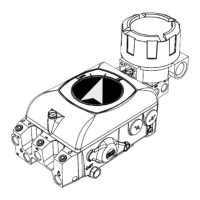
2.1 Installing external IP converter on V200P
NOTE! This instruction is for use when
converting from V200P to V200EX, V200FF or
other external IP converter.
When converting from V200E please follow the
instruction in section 2.2.
1. Loosen the screw (1) and remove the
plate(2).
2. Make sure there are three O-rings(3) in the
positioner housing.
3. Install the IP converter(4) and tighten the
screws(5).
4. Install the 1/4” plug(6) in the port marked I.
1 - External IPs are pre-calibrated to supply the
V200 positioner with the proper pneumatic
input signal, relative to electronic input.
NO CALIBRATION of the external IP is needed
2 - All External IPs are supplied air from the
V200 supply port. This internal porting pro-
vides the proper air supply to the external IP.
NO ADDITIONAL AIR PORTING
OF THE IP IS NEEDED
5



 To Next Page