9
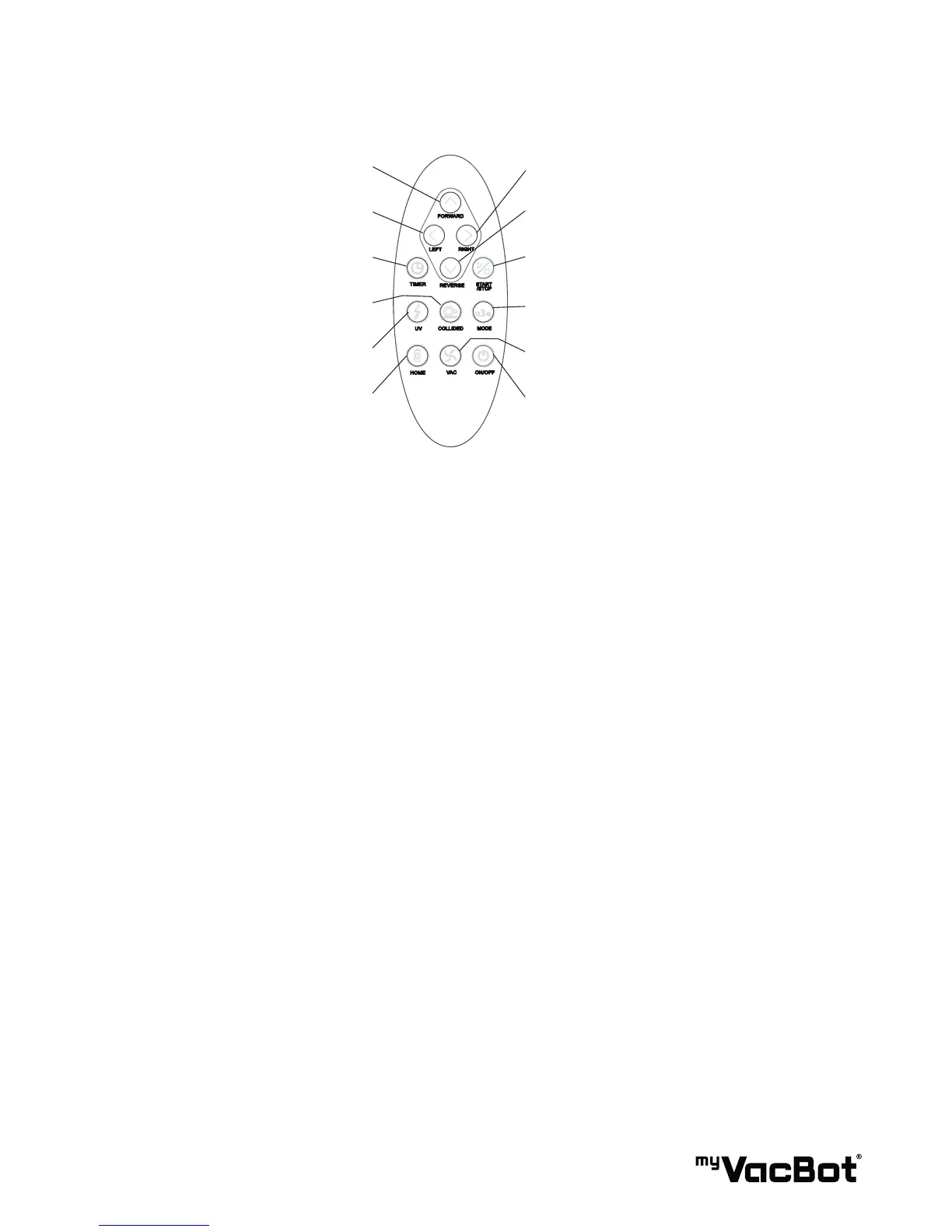
08 REMOTE CONTROL FUNCTION
5. Right4. Forward
5. Reverse5. Left
2. Start/Stop3. Timer
6. Mode10. Collided
8. Vacuum Motor ON/OFF7. UV-Light
1. Power ON/OFF9. Home
1. ON/OFF:
After power on main unit (by push down the Main power button), you can press ON/OFF keypad to
control myVacBot B100. (If the last power off myVacBot B100 was over 24Hr, for power saving and
battery life reason, you can not power on by remote control, please power on by Main power button)
2. START/STOP:
Press the Button to begin the automatic cleaning of the room. Or to stop the activity of the unit, and it
will emit a long sound.
3. TIMER: Use this button to set the cleaning time of the myVacBot B100.
4. FORWARD:
When press Forward, myVacBot B100 go forward and the suction fan is working, until user release the
keypad. If touched obstacle, myVacBot B100 will return.
5. LEFT/RIGHT/REVERSE: Use these buttons to manually drive the unit to the right, left and backward
6. MODE:
Movement pattern selected, press the keypad once to make the unit clean in :“1“ Spot Spiral ( From
small spiral to bigger, then bigger spiral to small, cycling ) „2“ Special Bounce, „3“ Wall-Following,
„4“ Zig-Zag, „5“ Polygonal, „A“ Automatic.
7. UV: Control the UV light turn on or off.
8. VAC: Control vacuum motor on or off.
9. HOME: Use this Button to make myVacBot B100 go back to the charging base.
10. COLLIDED:
Control unit cleaning method by soft-touched bumper or non-collided.


 To Next Page