6
ARY, Inc. | 5200 W 110th Street Suite 200, Overland Park, KS 66211 | VacMasterFresh.com | 800-821-7849
PRO360 Suction Vacuum Sealer | User Guide
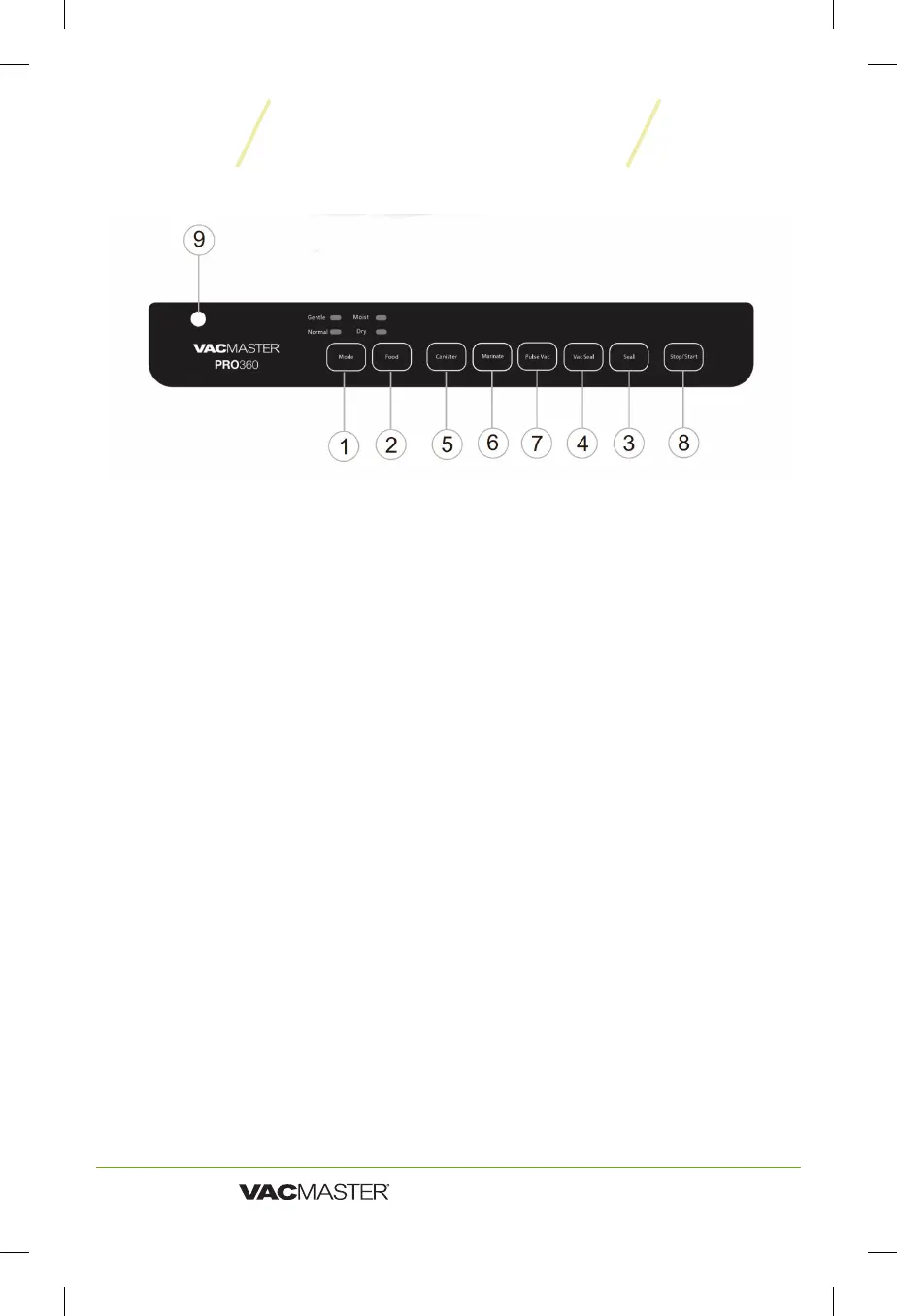
1 Mode Button Has two settings; "Normal" and "Gentle". Normal is the
default mode for most applications. Gentle is for fragile foods like chips,
pasta, certain fruits etc...
2 Food Button Has two settings; "Dry" and "Moist". Dry is the default for most
applications. Moist is for more moist foods like stew, etc...
3 Seal Button Press this button to seal bag. 40 second intervals are
recommended for optimal performance.
4 Vac/Seal Button Press this button to vacuum and seal bag. 40 second
intervals are recommended for optimal performance.
5 Canister Button Press this button when using an external canister.
6 Marinate Button Press this button to marinate food via the vacuum
process - get a great flavor in the shortest amount of time!
7 Pulse Vac Button Use this button to prevent crushing delicate items.
Simply press once and then press again and hold to control the vacuum
process manually.
8 Stop/Start Button Use this button to stop or start the vacuum process.
9 Accessory Hose Port Attach accessory hose here to vacuum canisters.
PRO360 Control Panel


 To Next Page