Need help?
Do you have a question about the Vacmaster VP540 and is the answer not in the manual?
Explanation of how filler plates affect vacuum speed and chamber space.
Information about the function and maintenance of the seal bars.
How to read and understand the vacuum level indicator on the control panel.
Meaning and purpose of the various indicator lights on the control panel.
Description of the STOP, SET, UP/DOWN, and Program buttons.
Guidance on the recommended frequency for oil changes and level checks.
Guide to setting initial vacuum, sealing, and cooling times for the unit.
Advice on choosing the correct size and type of vacuum pouch for optimal sealing.
Instructions on filling, folding, and placing the pouch correctly for sealing.
Guidance on closing the lid, starting the process, and observing cycle indicators.
How to check for proper vacuum and seal integrity after the cycle.
Explanation of the CO code and the machine's oil change reminder system.
Addresses power connection, switch, and lid lock issues.
Solutions for incomplete vacuum, lost vacuum, and poor seals.
Identification and purpose of parts found in the maintenance kit.
 General
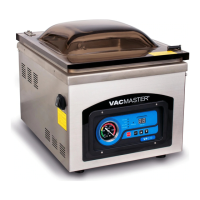
| Brand | Vacmaster |
|---|---|
| Model | VP540 |
| Color | Stainless Steel |
| Voltage | 120V |
| Sealing Method | Heat Seal |
| Seal Bar Length | 16" |
| Seal Time | Adjustable |
| Vacuum Pressure | 29.5 inHg |


 To Next Page