10
GB
4. Blower Operation
WARNING:
KEEP BYSTANDERS CLEAR FROM BLOWING DEBRIS.
WARNING:
WEAR A DUST MASK IF BLOWING CREATES DUST THAT MIGHT BE
INHALED.
1) Make sure the container and any collected waste is emptied before using as a blower. This also
includes removal of the dust bag.
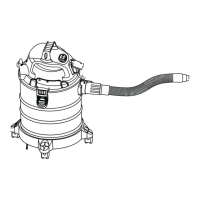
2) Insert the locking end of the hose into the blowing port on the rear of the power head (Fig. 8).
3) Turn on the motor on by turning the switch to the ‘I’ ON position.
MAINTENANCE
WARNING:
REMOVE THE POWER CORD FROM THE POWER SUPPLY BEFORE
CARRYING OUT ANY MAINTENANCE.
1) Keep all safety devices, air vents and the motor housing free of dirt and dust. Use a soft, dry
brush to clean the equipment regularly.
2) Clear all dirt or debris from the collection tank after each use. Allow to dry before replacing the
power head. Do not use cleaning agents or solvents; these may damage the appliance.
3) Check the hose, attachments, and power cord to verify that they have not been damaged or
any debris is trapped and blocking airow.
1. Cleaning Cartridge Filter
Remove the lter and clean by gently tapping or brushing off dirt. For optimal performance it is
recommended to replace the old lter with a new lter regularly.
2. Cleaning Foam Filter
Remove the foam lter and use a mild soap and water solution to wash and rinse with clean water
(Fig. 9). Allow lter to air dry before installing and using again.


 To Next Page