Combining Microphone Channels into Flows
DANTE CONTROLLER APPLICATION
The EasyIP Mixer or AV Bridge 2x1 can only receive two Dante audio flows. Each EasyIP microphone
provides a pass-through channel as well as its own audio channel, so one microphone can be routed to
another, which creates a flow with two microphone channels that can be routed to the host device. Think
of it as daisy-chaining the microphones, but without the cable.
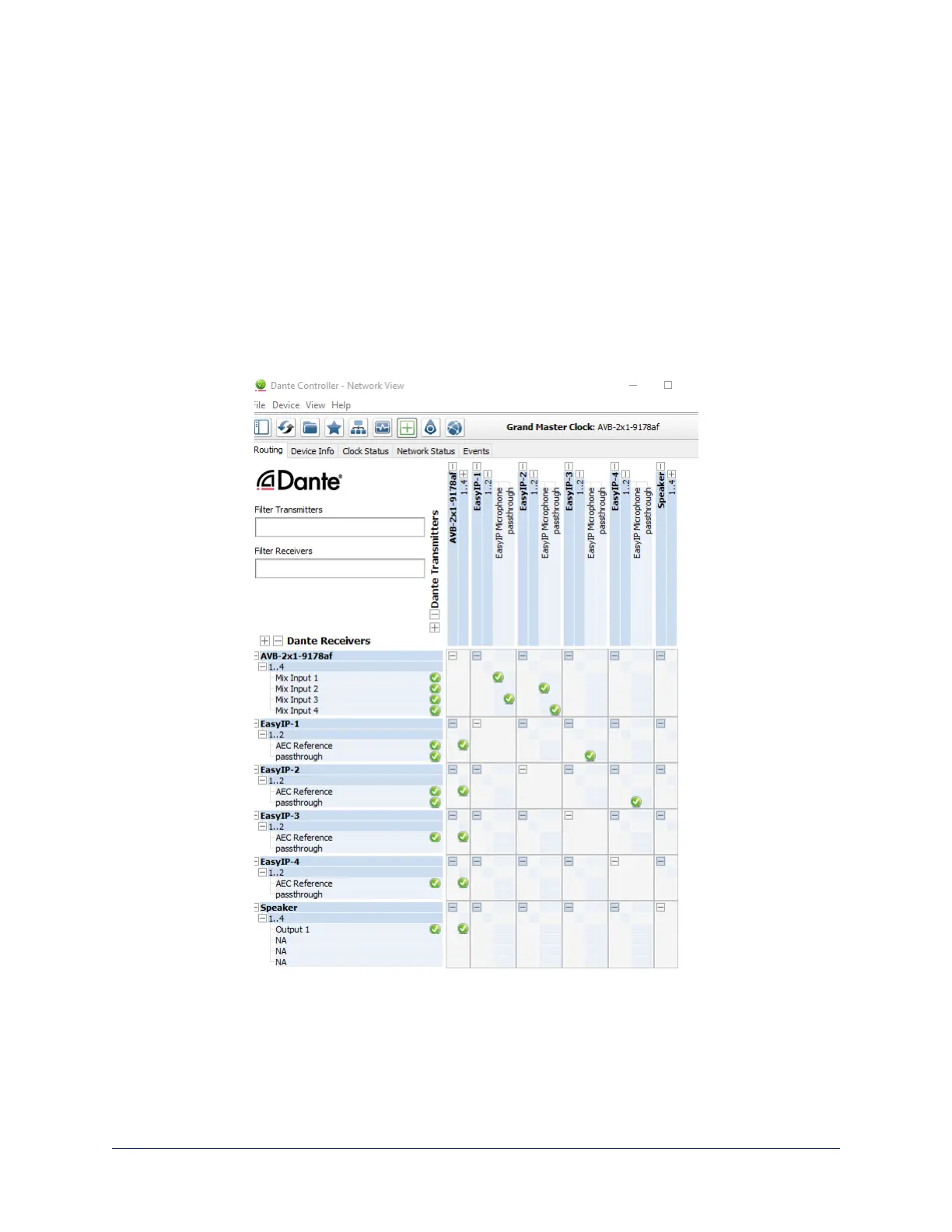
In the screen shot below, locate the microphones in the Dante Receivers column. Each receives its AEC
reference from the Mix Output 1 channel that we set up as a multicast flow. Microphone EasyIP-1 also
receives a pass-through channel from microphone EasyIP-3; microphone EasyIP-2 receives a pass-
through channel from microphone EasyIP-4.
Each of the host device's four Mix Inputs receives the channel from the corresponding microphone, but
the four channels are all coming from microphones EasyIP-1 and EasyIP-2.
Complete Manual for TableMIC and EasyIP TableMIC D Conference Room Microphones
18


 To Next Page