17Operating Manual VRC 430 0020042468_02
The comment field contains the text "Select target
room temperature".
⇒ Press the right-hand dial.
The input field is highlighted.
⇒ Turn the right-hand dial until the desired value is
displayed (values from 5 °C to 30 °C in
increments of 0.5 °C and frost protection function
are possible).
⇒ Press the right-hand dial.
The desired target room temperature or the frost func-
tion are set. The display jumps highlighted to normal.
4.7.3 Entering parameters for the heating circuit
You can enter the following parameters:
Set-back temperature
Outside the specified time windows, the heating is re-
duced to the set-back temperature.
If your expert technician has set the frost protection
function, the set-back temperature will automatically
be 5 °C. There is no display of set-back temperature.
Heating curve
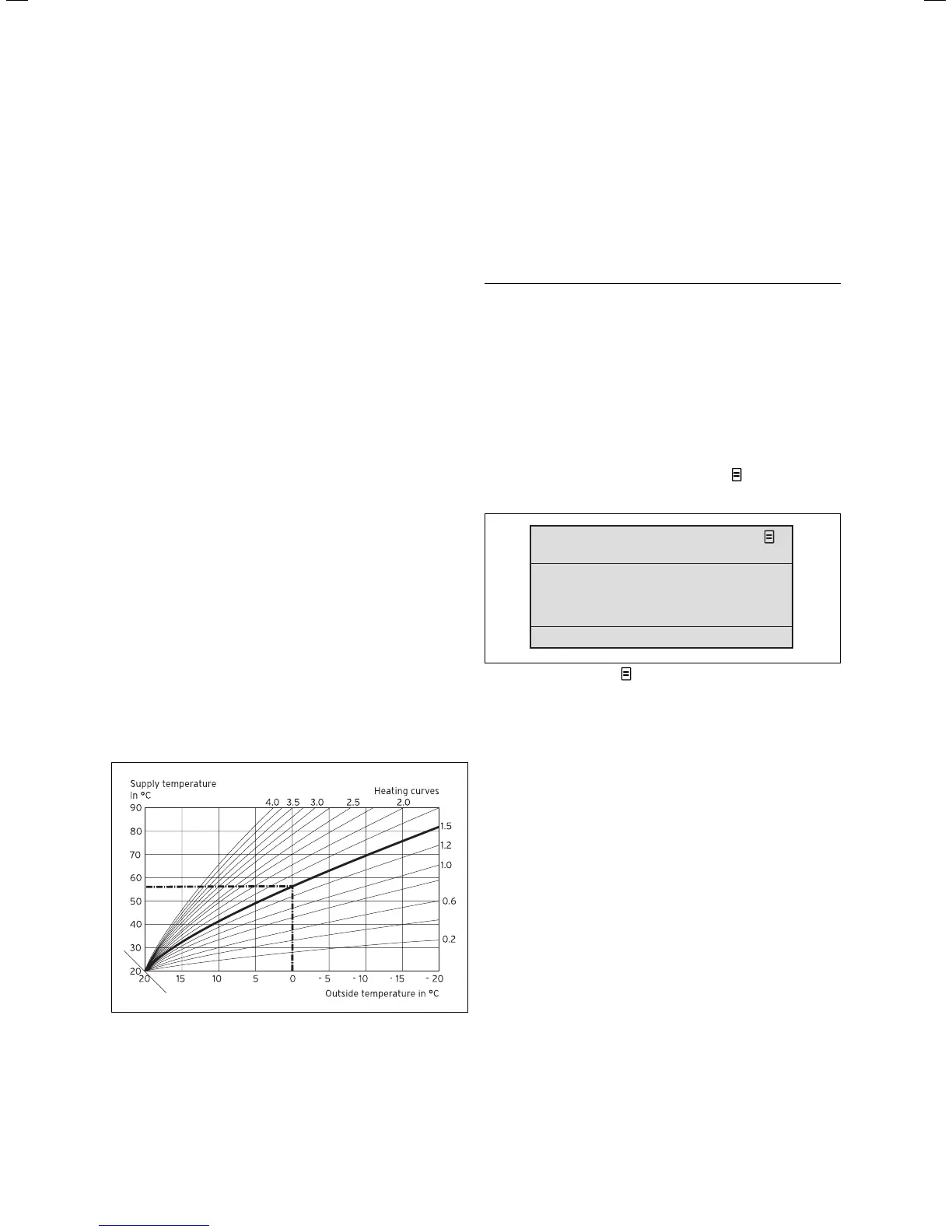
The relationship between the outside temperature and
the required heating feed temperature is represented
in a diagram having various different heating curves
(see Fig. 4.15). Each heating curve (from 0.2 - 4.0)
gives a value for the heating flow temperature (verti-
cal diagram axis) for the individual outside tempera-
ture (horizontal diagram axis).
Fig. 4.15 Diagram with heating curves for a target room tem-
perature of 20 °C
Example:
If you select a heating curve of 1.5 with a target room
temperature of 20 °C, the controller provides a heating
flow temperature of 56 °C at an outside temperature of
0 °C.
The various heating curves indicate whether the heating
flow temperature should be higher or lower depending
on the outside temperature.
h
Note!
In a well-insulated apartment a comfortable
room temperature can be achieved even with a
flat heating curve. This saves heating energy.
Your expert heating technician will provide ad-
vice as to which heating curve should be se-
lected.
Proceed as follows to enter the parameters (example
heating circuit 1):
⇒ Turn the left-hand dial until screen 8 "HC1 param-
eters" is displayed.
> Select temperature
HC1
8
Set back temperature
Parameter
Heating curve
15 . 0 ° C
1 . 2
Fig. 4.16 Display screen 8 (example)
⇒ Turn the right-hand dial until the cursor
is in front
of the input field for the set-back temperature.
The comment field contains the text "Set temperature".
⇒ Press the right-hand dial.
The input field is highlighted.
⇒ Turn the right-hand dial until the desired value is
displayed (values from 5 °C to 30 °C in
increments of 0.5 °C are possible).
⇒ Press the right-hand dial.
The desired set-back temperature is set. The display
jumps highlighted to normal.
⇒ Turn the right-hand dial until the cursor
is in front
of the heating curve value.
The display field shows the text "set heating curve" in
the comment field.
⇒ Press the right-hand dial.
Operation 4
17







 To Next Page