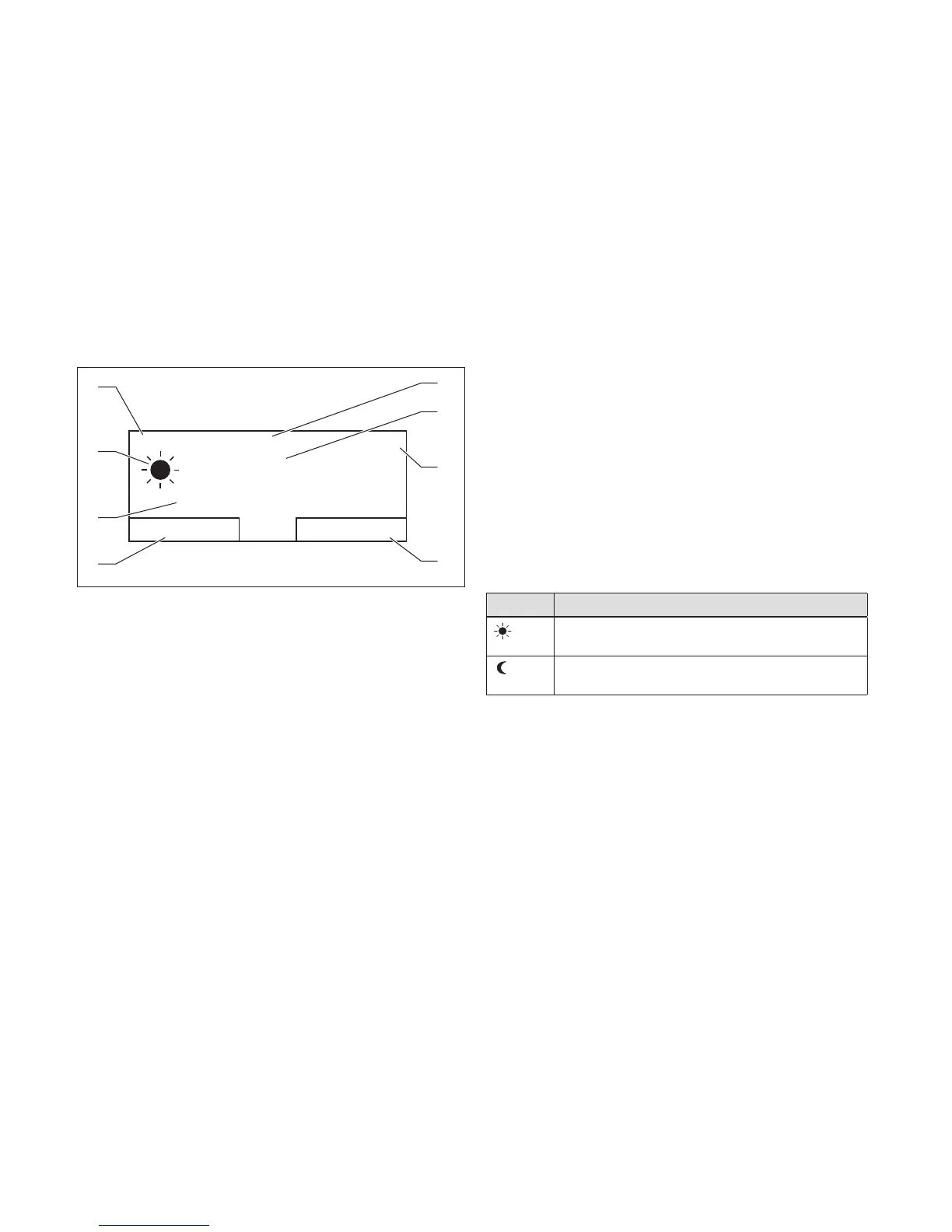
1 Date
2 Current room temperat-
ure
3 Time
4 Current function of the
right-hand selector button
(soft key function)
5 Current function of the
left-hand selector button
(soft key function)
6 Desired temperature
7 Symbol for heating mode
in Auto mode
8 Mode set for the heating
mode
The controller is battery-powered. To save power and thus
extend the working life of the batteries, the display is nor-
mally switched off. If you press one of the selection but-
tons or turn the rotary knob, the backlighting switches on
and the basic display appears. At this point, you have not
changed any settings. Only if you press one of the selec-
tion buttons or turn the rotary knob when the display is
switched on are the settings changed.
The basic display shows the current settings and values of
the heating installation. If you make a setting on the con-
troller, the display on the screen switches from the basic
display to the display for the new setting.
The backlighting goes out approx. 10 seconds after the last
operation. The display switches off approx. 1 minute after
the last operation.
4.1.4.1 Symbols for the heating mode in the Auto
operating mode
Symbol Meaning
Heating mode within a set time period (comfort
mode)
Heating mode outside a set time period (set-back
mode)
4.1.4.2 Soft key function
Both selector buttons have a soft key function. The current
functions of the selector buttons are displayed in the bot-
tom display line. Depending on the selection level selected
in the menu structure, the list entry or the value,
– the current function of the left-hand selection button
may differ.





 To Next Page