


 Need help?
Do you have a question about the Vaillant VRC 700f and is the answer not in the manual?
Classifies action-related warnings by severity using warning signs and signal words for potential dangers.
Provides crucial general safety guidelines and warnings regarding improper operation and potential risks.
Explains the core function as a weather-compensated system control managing heating and other components.
Explains the frost protection mechanism that safeguards the heating installation from freezing.
Explains how to operate the system control using selection buttons and a rotary knob.
Guides users on setting desired temperatures, ventilation levels, and time programmes.
Explains how to activate and configure different operating modes like Heating, Cooling, and Ventilation.
Provides guidance on operating the system using a back-up boiler when the heat pump fails.
Lists common symptoms, their possible causes, and recommended troubleshooting measures.
Provides a list of maintenance messages, their descriptions, required work, and intervals.
This document describes the Vaillant VRC 700/6 weather-compensated system control, designed to manage heating installations with heat generators from the same manufacturer via an eBUS interface. It provides comprehensive instructions for operation, settings, troubleshooting, and maintenance, catering to both end-users and competent persons.
The VRC 700/6 system control is a weather-compensated device that works in conjunction with an outdoor temperature sensor and a heat generator. It regulates various aspects of a heating installation, including heating, cooling, ventilation, domestic hot water generation, and circulation.
Heating: The system control continuously monitors the outdoor temperature. When the outdoor temperature is low, it increases the flow temperature of the heating installation to maintain the desired room temperature. Conversely, it reduces the flow temperature when the outdoor temperature rises. The system control can operate in different modes: "Auto" (maintains desired day temperature during programmed times, switches to Eco or Set-back outside these times), "Eco" (switches off heating but monitors outdoor temperature, activating heating to set-back temperature if below 3°C), "Set-back" (maintains a low room temperature), and "Day" (maintains desired day temperature continuously).
Cooling: If the room temperature exceeds the set desired temperature, the system control activates cooling. Similar to heating, it can operate in "Auto" (maintains desired cooling temperature during programmed times, switches off cooling outside these times) or "Day" (maintains desired cooling temperature continuously). A "Manual cooling" advanced function allows for temporary activation of cooling for a specified number of days, taking priority over heating.
Ventilation: The system control manages a connected ventilation unit to ensure controlled air exchange. It regulates air volume flow based on set ventilation levels. In "Auto" mode, it controls the ventilation unit to a maximum ventilation stage (Day or Night) during programmed times. If air-quality sensors are connected, the ventilation unit can adjust levels based on air quality, staying within the set maximum stages.
Domestic Hot Water Generation: A temperature sensor in the domestic hot water cylinder feeds data to the system control. If the water temperature falls below the set value, the system control heats the water to the desired temperature. This can operate in "Auto" (maintains desired temperature during programmed times, switches off outside these times) or "Day" (maintains desired temperature continuously). The "Cylinder boost" advanced function temporarily heats the domestic hot water cylinder to the set desired temperature for one hour.
Circulation: The system control manages a circulation pump that moves domestic hot water through the pipes, ensuring hot water is available at draw-off points. This function operates in "Auto" mode, with operating times determined by set time programmes.
Hybrid Manager: For installations with both a heat pump and an additional boiler, the hybrid manager selects the most cost-efficient heat generator based on set tariffs and heat demand. Correct tariff settings are crucial for optimal operation and cost efficiency.
Frost Protection: This function safeguards the heating installation and property from frost damage by monitoring the outdoor temperature. If the outdoor temperature drops below 4°C, the heat generator is activated after a delay to bring the target room temperature to 5°C.
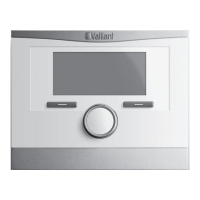
The system control is operated via two selection buttons and a rotary knob, offering an intuitive interface.
Navigation and Selection: The selection buttons allow users to navigate through menu levels, select and confirm set values, access operating modes, and cancel changes. The rotary knob is used to scroll through list entries, select levels, and change set values. A highlighted element with white writing on a black background indicates selection, while a flashing highlighted value signifies that it can be changed.
Basic Display: The basic display shows essential current settings and values, including outdoor temperature, room temperature, time, and desired temperatures/ventilation levels. Users can configure a preferred zone and operating mode to be displayed.
Setting Desired Temperatures: Users can set desired day and set-back temperatures for heating and cooling in different zones, as well as the desired domestic hot water temperature.
Time Programmes: The system control allows for the creation of time programmes to switch between different settings at specified times for heating, cooling, domestic hot water, circulation, and ventilation. Up to three time periods can be set for individual days or predefined blocks (e.g., Monday-Friday).
Advanced Functions: Several advanced functions can be activated directly from any operating mode:
Basic Settings: Users can adjust various basic settings, including language, date/time, daylight saving time (automatic or manual), display contrast, and button lock. The button lock prevents unintentional changes after a period of inactivity.
Cost Settings: For hybrid systems, users can input tariffs for auxiliary heaters, low-tariff electricity, and high-tariff electricity to enable the hybrid manager to calculate costs correctly.
Offset Settings: Users can apply an offset to the measured room and outdoor temperatures to correct displayed values.
Zone Naming: Zone names can be customized for better identification.
Heat Recovery: The heat recovery function can be set to "Auto" (system checks if heat recovery is sensible) or "Activate" (constantly uses heat recovery).
Room Air Humidity: Users can set a maximum room air humidity level, which activates a connected dehumidifier if exceeded.
The system control provides information and messages to assist with maintenance and troubleshooting.
System Status: Users can view the current system status, including fault status, Green IQ status (if applicable), water pressure, operating mode, collector temperature, solar yield, environmental yield, room air humidity, and dew point.
Energy Consumption and Yield Display: The control estimates and displays values for energy consumption (heating, hot water, electricity, fuel) and energy yield (solar, environmental, heat recovery) for current month, last month, and historical data since start-up. Diagrams compare monthly yields between the previous and current year.
Fault Messages: If a fault or maintenance is required, the system control displays a message (e.g., "Fault F.33: Heat generator 1"). Users can attempt to reset fault messages. If the fault persists, a competent person should be informed.
Maintenance Messages: The system control displays maintenance messages (e.g., "Service heat pump 1," "Low water pressure") to indicate when maintenance is due or required. These messages prompt users to consult the operating instructions for the relevant unit or inform a competent person.
Limp Home Mode: If the heat pump fails, the system control enters a "limp home mode," where the back-up boiler supplies heating energy. Users can select different settings in this mode (Inactive, Heating, DHW, DHW+heat) to prioritize comfort while awaiting a competent person.
Contact Details: If entered during installation, the competent person's company name and telephone number can be viewed.
 General
| Mounting | Wall-mounted |
|---|---|
| Protection class | IP 20 |
| Radio frequency | 868 MHz |
| Product type | Controller |
| Compatibility | Vaillant heating systems |
| Application | Heating control |
| Display | LCD |
| Connectivity | Wired and wireless |
| Functions | Weather compensation |
| Communication | eBUS |
| Power supply | 230 V |
| Operating Temperature | 0°C to +40°C |




 To Next Page