EasyManua.ls Logo

Valcom V-1040 - User Manual

Valcom V-1040
4 pages
Print Icon
To Next Page IconTo Next Page
Loading...
Issue 0
1 947994
V-1040
INSTALLATION INSTRUCTIONS FOR
CLEAN ROOM CEILING SPEAKER
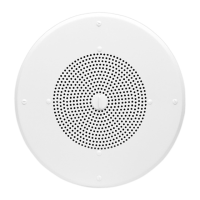
The Valcom Ceiling Speaker, V-1040 is a self-amplified and capable of reproducing voice paging in clean room
environments. The V-1040 has a screwdriver adjustable volume control located on the 1 watt amplifier circuit
board. The V-1040 has an 8-inch speaker. The speaker requires -24VDC, 50mA (1-power unit). The speaker
features the following, large rubber o-ring to seal the grille to the ceiling, rubber washers for all mounting hardware
and a polycarbonate dust shield located between the speaker and the grille.
Dimensions/Weight
V-1040 13.00"Dia. x 3.00"D (33.02cm Dia. x 7.62cm D) 2.5 lbs. (1.13kg)
Coverage
The area covered by a ceiling speaker is determined by the height of the ceiling. If ceiling height is 8 feet,
the speaker will cover 256 sq. ft. With a ceiling height of 10 feet, the speaker will cover 400 sq. ft. If the
ceiling is 20 feet high, the speaker will cover 1600 sq. ft.
Connections
Refer to Figure 1 for audio and electrical
connections. Category 3 24 AWG structured
cable may be used for all connections.
FIGURE 1: TYPICAL CONNECTIONS
NOTE: Do not connect this speaker directly
to a 25/70/100 Volt amplifier as damage to
both the amplifier and speaker may occur.
A V-1095 may be used to allow the use of
Valcom self-amplified speakers on 70V
speaker lines.
Installation
Suspended Ceiling Installation
After determining the speaker location and referring to Figure 2 cut an 8.5” diameter hole in the ceiling
tile. Attach the backbox to the bridge with the four screws provided and position the assembly on the
back of the ceiling tile. Before continuing speaker installation using a small screwdriver set Volume
Control to 2/3 rotation. Place the large rubber O-ring on the back of the speaker assembly and using
the four screws equipped with washers and O-rings mount the speaker assembly to the bridge/backbox
assembly. Do not over-tighten the speaker mounting screws. Hand-tighten only. For a proper seal the
large O-ring should compress slightly. It is not necessary for the edge of the metal grille to touch the
ceiling tile for a proper seal. Refer to Figure 2.
Page
Out
Valcom Page
Control
(Tip/A)
(Ring/B)
(-24Vdc)
(Gnd)
Valcom -24 Vdc
Power Supply
One-Way
A
mplified
Speaker

Other manuals for Valcom V-1040

Questions and Answers

  • K
    kharrisAug 11, 2025
    How to fix low volume on Valcom V-1040 Speakers?
    • I
      ischaeferAug 11, 2025
      If you're getting low volume from your Valcom Speakers, make sure the volume control is turned up. Also, check the voltage at the speaker assembly during use; it should be between -18 to -24VDC. You can also use a lineman's test set to check for the correct audio level on the Tip and Ring leads. Note that some low-level audio might be heard with only one side of Tip and Ring connected.
  • K
    Katelyn GriffinAug 20, 2025
    Why are my Valcom V-1040 Speakers squealing?
    • C
      Chad EstradaAug 20, 2025
      If you are experiencing loud squealing (feedback) from your Valcom Speakers, try the following: * First, turn down the speaker volume counter-clockwise. * Second, increase the distance between the telephone and the speaker. * For severe cases, consider installing a noise-canceling handset on the telephone. * You may also consider adding a V-9962 Digital Feedback Eliminator.
  • P
    Pamela MannAug 30, 2025
    What to do if there is no audio from Valcom V-1040 Speakers?
    • A
      anthonyolsonAug 30, 2025
      If there is no audio coming from your Valcom Speakers, first check that the volume control is turned up clockwise. If that doesn't work, use a lineman's test set to check for the correct audio level on the Tip and Ring leads, and if necessary, check at the source as well.

Summary

Product Specifications

Dimensions and Weight

Provides the physical dimensions and weight of the V-1040 ceiling speaker.

Coverage Area

Details the speaker's coverage area based on varying ceiling heights.

Electrical Connections

Explains the audio and electrical connections, including power supply and amplifier types.

Installation Guide

Suspended Ceiling Installation

Step-by-step instructions for mounting the speaker in a suspended ceiling.

Solid Surface Ceiling Installation

Instructions for installing the speaker in a sheetrock or hard ceiling.

Technical Assistance and Warranty

Troubleshooting Chart

A guide to diagnose and resolve common issues with the speaker's performance.

Limited Warranty Information

Details the terms and conditions of the Valcom product warranty.

Valcom V-1040 Specifications

General IconGeneral
BrandValcom
ModelV-1040
CategorySpeakers
LanguageEnglish

Related product manuals