www.valcom.com
I
540.563.2000
I
800.825.2661
®
VIP-102B IP Solutions SetupTool
Page 8
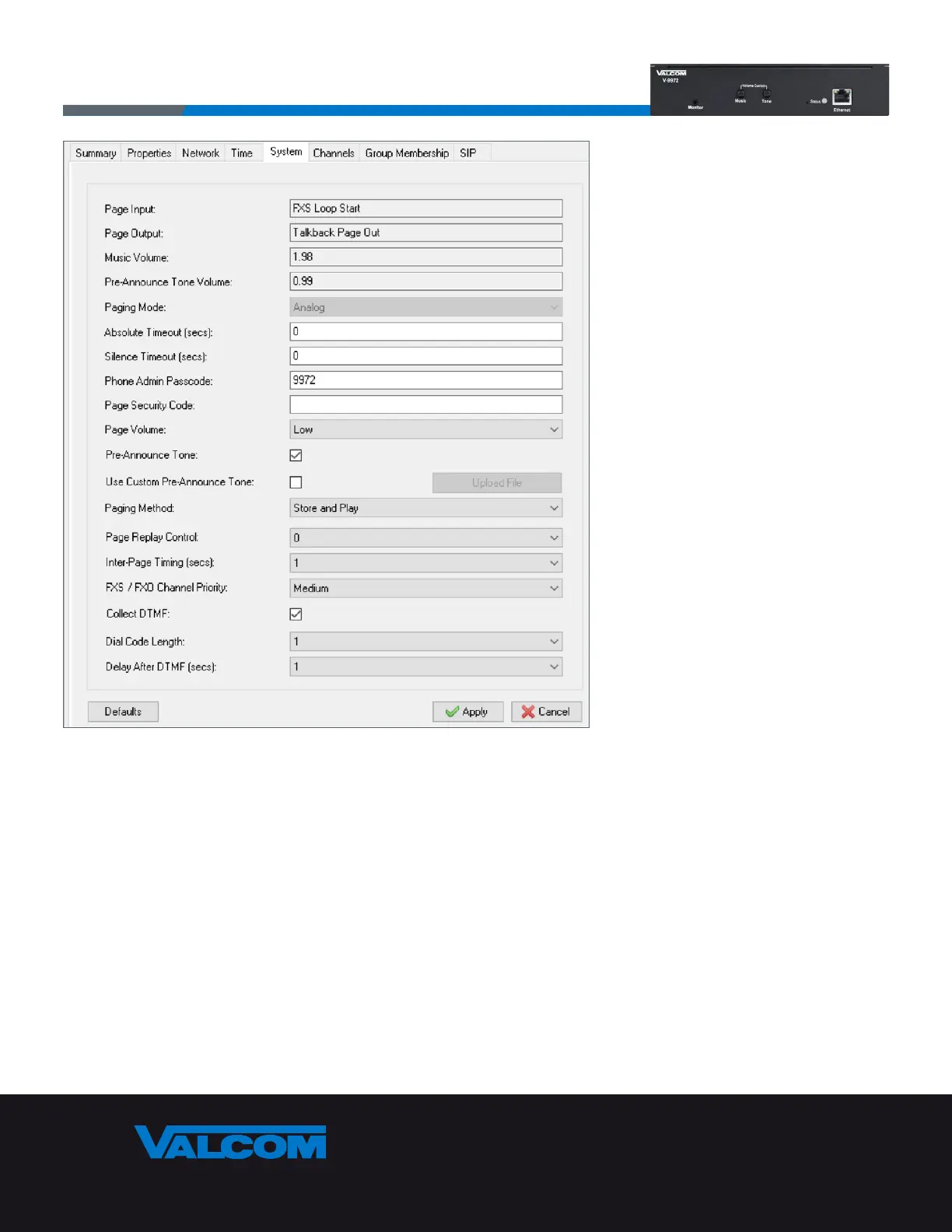
The System tab is where most of the device-specific capabilities are configured.
The first items shown are read-only and indicate the hardware switch positions and volume control knob positions.
These must be set directly on the V-9972 and cannot be controlled through software.
Page Input – Indicates which Analog input port (either FXS or FXO) is active. This is controlled by DIP switch SW6 with
OFF making FXO active and ON making FXS active.
Page Output – Indicates the active Analog output connection. This can be One-Way Page Out or Talkback Page Out
and is controlled by DIP switch SW1 with OFF being One-Way Page Out and ON being Talkback Page Out.
Music Volume – Indicates the volume level for Background Music set by the knob labeled Music on the front of the
V-9972. The range is approximately 0 to 2.
Pre-Announce Tone Volume – Indicates the volume level for Page Alert Tone played just before a page announcement.
It is set by the knob labeled Tone on the front of the V-9972 and has a range of approximately 0 to 2.



 To Next Page