354FXM70EN - 8/2022
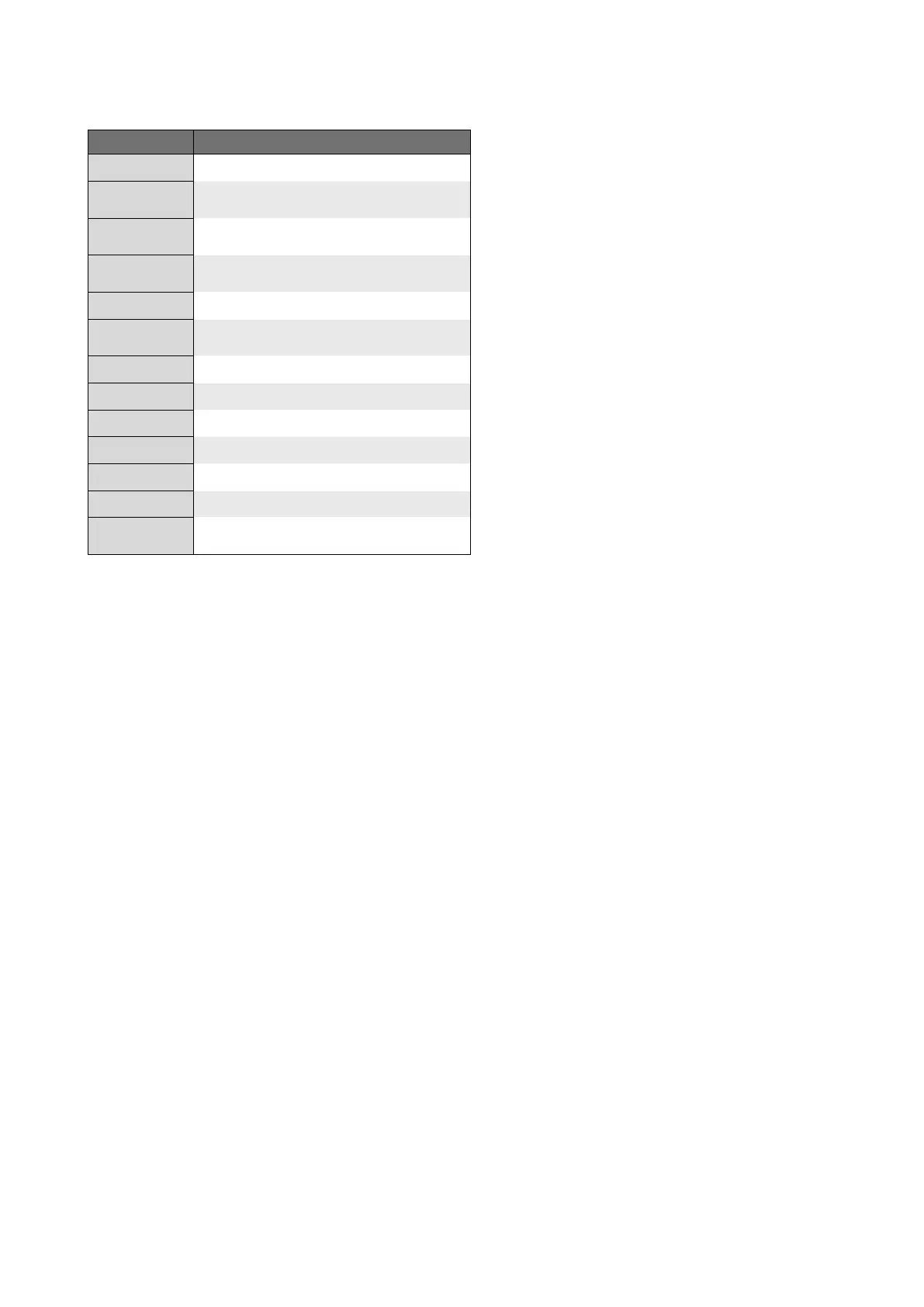
Description of Relay and Contact Closure Output triggers
Selection Contact energizes when
Pump Run/Stop Motor turning (roller assembly is rotating).
Monitor Input
Incoming analog or digital signal is not received or is
out of range.
Monitor Output
Outgoing analog or digital signal not transmitted or is
out of range.
Monitor Run/Fail
Motor fails to respond to commands from the internal
controller.
Both TLD/FVS Either TLD or FVS system triggers.
FVS
After the programmed delay time, pulses are not
received from flow sensor.
TLD Tube leak is detected by sensors in the head.
Active Mode The selected run mode is currently activated.
Remote Active Energized when Remote only is activated.
Reverse Alarm The motor revolution is reversed (turning clock-wise).
General Error A motor overload or other internal error has occurred.
Disable Output alarm contact is disabled.
5.1 Signal Output
Sends a congurable 4 - 20 mA or frequency (Hz) signal to
another pump or external device. is feature can be used to
control other pumps (in sync / proportionally), data logging
systems, and other external devices for plant automation.
Output Setup menu structure, see page 39.
Default settings: Disable
Navigate to Signal Output menu by pressing MENU button,
then selecting Output Setup, and then Signal Output.
Select your desired Signal output using UP or DOWN
arrows.
Press ENTER to congure output signal.
Press UP or DOWN arrow to scroll through 0 - 9 on selected
digit.
Press RIGHT arrow to scroll over to next digit to right. If
you pass your desired digit, you can easily scroll back by
continuously pressing RIGHT button.
Press ENTER to save changes.
Continue this process until all four screens have been
congured.
To navigate back out of menu structure you must select OK
at bottom of every screen menu until you see Run Mode
screen displayed.


 To Next Page