374FXM70EN - 8/2022
In this mode, the pump rotor can rotate up to 6 revolutions
per minute for your safety.
Auto-restart feature is not available in the Maintenance
mode.
Pull out suction side of Tubing Assembly.
Press START button. While rotor is rotating, pull out old
Tube Assembly.
TIP! Let pump do the work for you. Just guide tubing out
between two rollers located on Rotor once the second end of
the tube is past the second compression roller and is nearing
the tting location, allow the next press roller on the rotation
to gently press the tube forward and you can pull the tube in
the rest of the way.
Press STOP button at any time to stop the pump.
Pull out suction line adapter from Pump Head. Pull out
Tubing Assembly as the Rotor rotates around.
Stop pump by pressing STOP button.
oroughly clean Pump Head and Rotor. Rotor can be
removed by pulling straight out. Aer cleaning process, push
Rotor back on sha. See drawing above for proper assembly.
6.4 Tube Replacement
Prior to service, pump clean water through the pump
and suction / discharge line to remove chemical.
Always wear protective clothing, face shield, safety
glasses and gloves when working on or near your
metering pump. Additional precautions should be taken
depending on solution being pumped. Refer to MSDS
precautions from your solution supplier.
CAUTION!
Crushing hazard.
Use extreme caution when replacing pump
tube. Be careful of your ngers and DO
NOT place ngers near rollers.
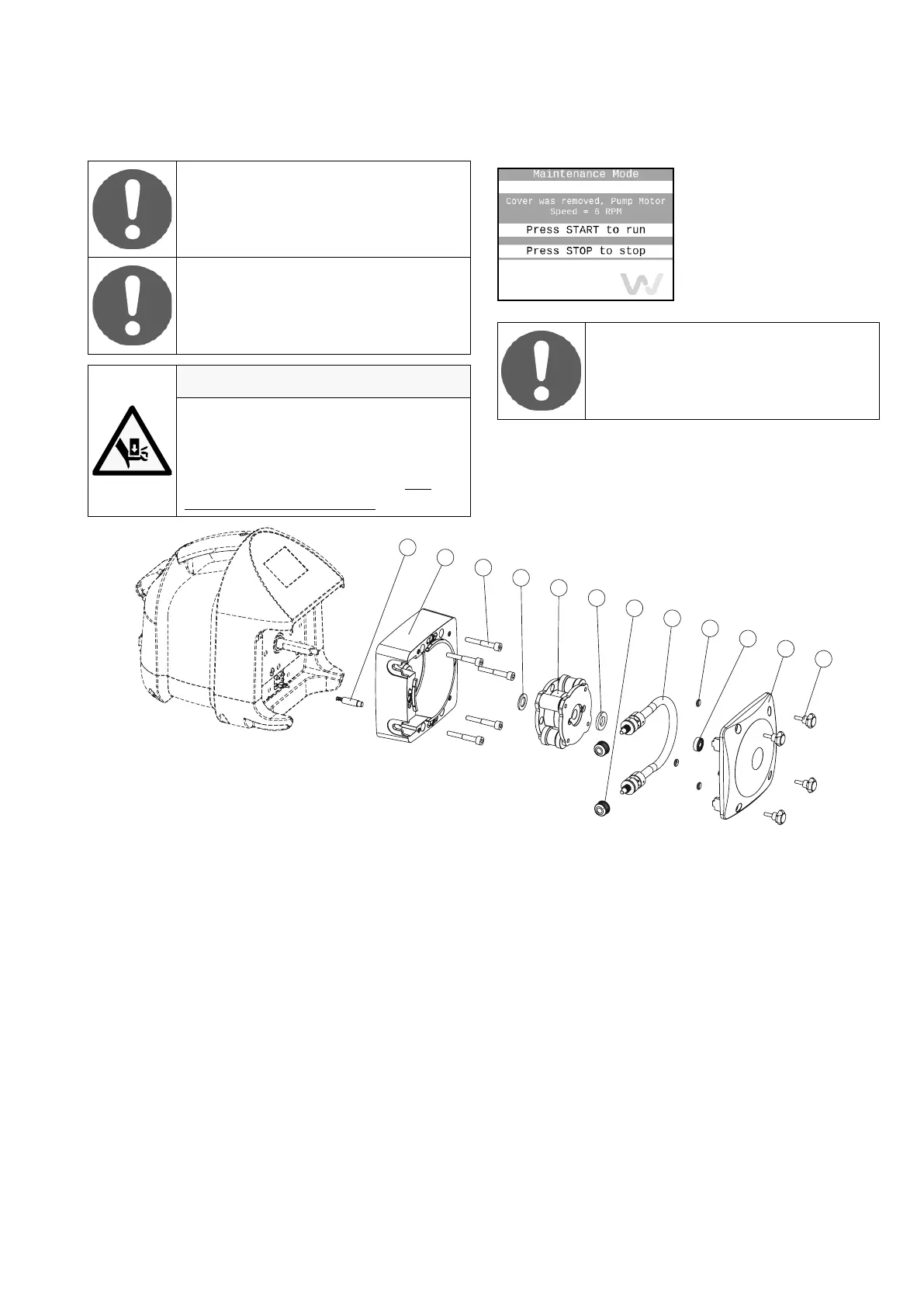
1. Screw
2. Cover
3. Bearing
4. O-ring
5. Tube assembly
6. Washer
7. Rotor assembly
8. Washer
9. Hex socket screw
10. Body
11. Plunger assembly
* Only with 3/8" tube nut connectors
Remove Pump Head Cover by unscrewing four umb
Screws. Pull out Pump Head Cover.
e pump detects that the pump head cover has been
removed and enters in the Maintenance mode.
11
10
9
8
7
6
*5.1
4
3
2
1
5


 To Next Page