Page 16
© Baxi Heating U.K. Limited 2011.
9. LIGHT SHUTTER ADJUSTMENT
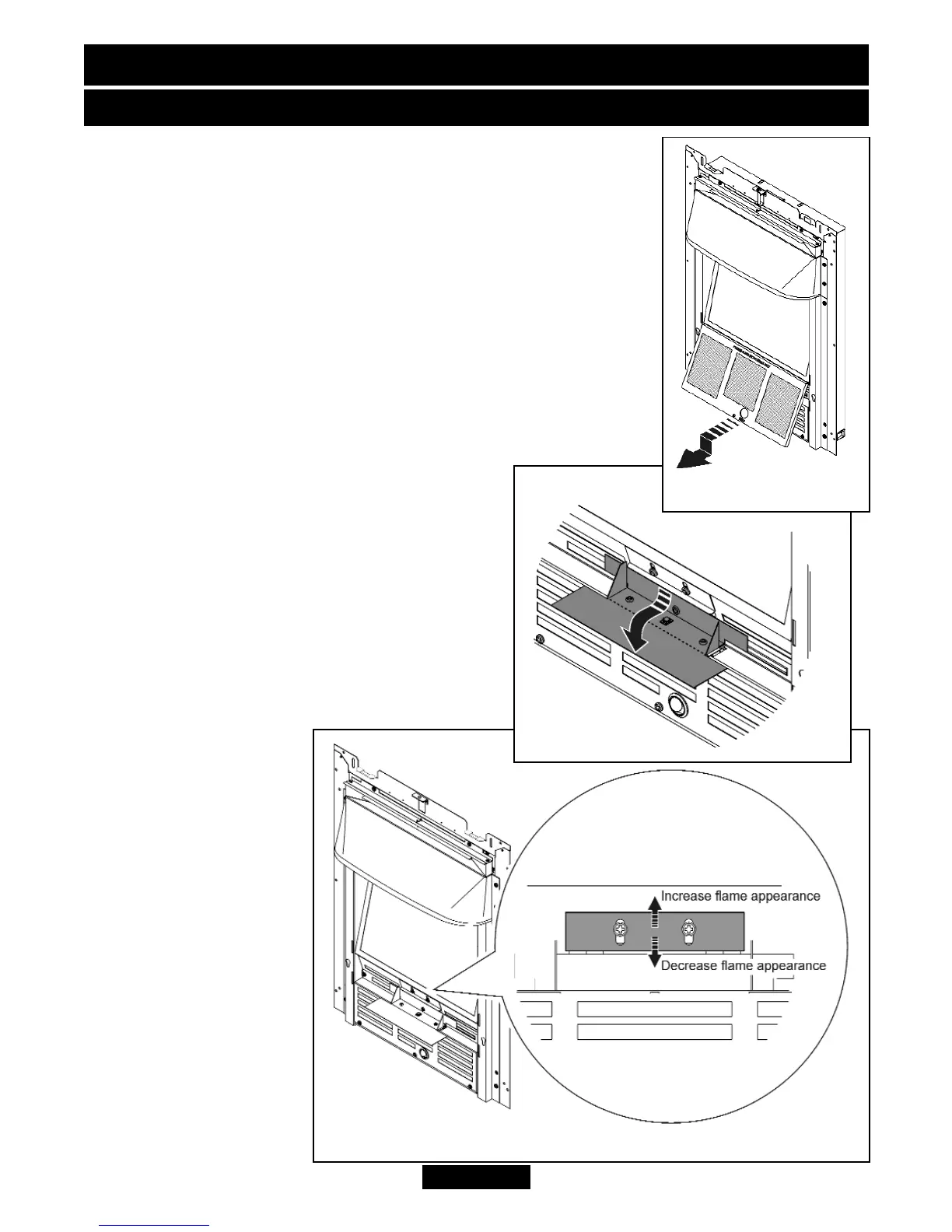
The light shutter is an adjustable plate that increases and
decreases the appearance of the flames in the flame effect.
1. Switch on the fuel effect. If you are satisfied with the
appearance of the flame effect there is no need to adjust the
light shutter.
2. To gain access to the light shutter, unscrew and remove the
thumbscrew from the bottom of the filter panel. Gently pull the
base of the filter panel forward and down to remove it from the
heater (See figure 15). There is a black card baffle in front of
the light shutter; hold both sides and gently pull this forward to
gain access to the light shutter (See figure 16).
3. To adjust the light
shutter, loosen the two
screws then lift the
shutter to increase the
appearance of the
flames or lower it to
decrease the
appearance of the
flames (See figure 17).
4. When you have
obtained the required
flame appearance,
tighten the two screws
and secure the shutter
in place, replace the
card baffle and filter
panel.
Figure 17. (Heater may differ from that shown)
Figure 16.
Figure 15.
INSTALLER AND OWNER GUIDE


 To Next Page