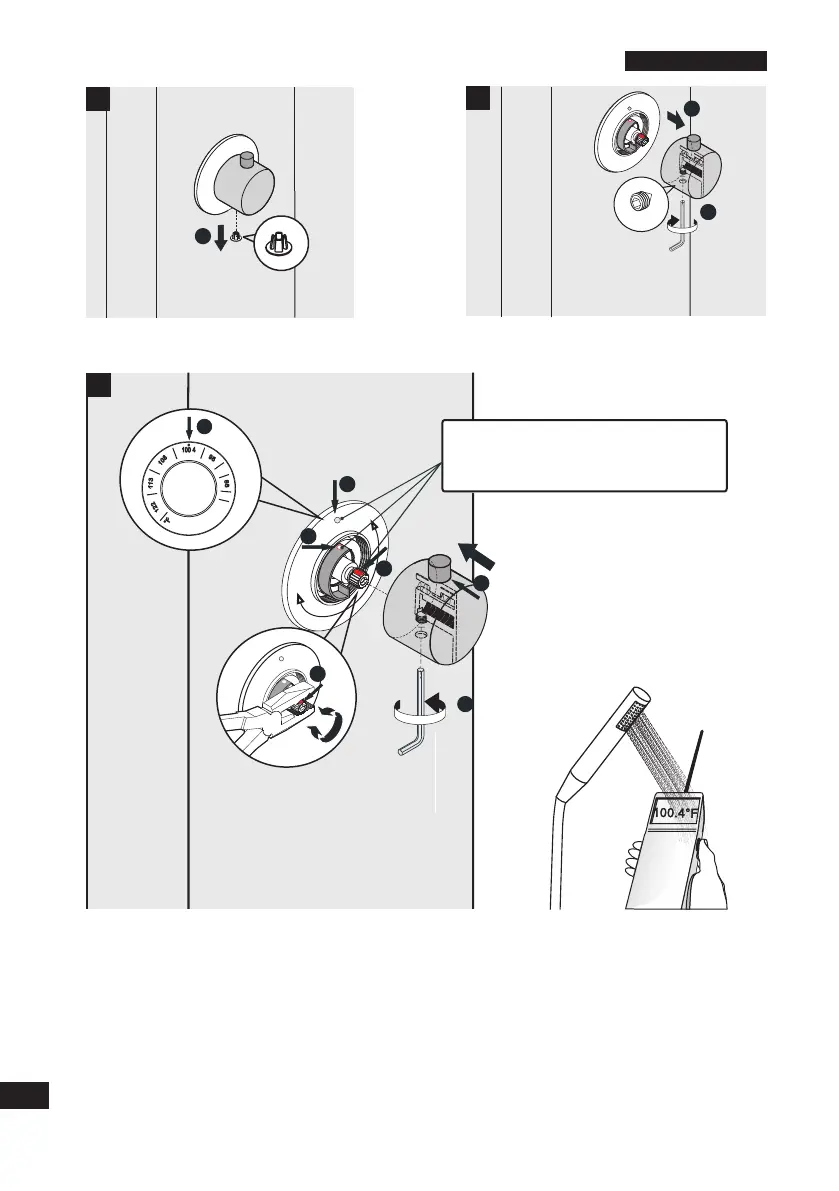
• Assuming the water temperature of 100.4 F will represent the thermostatic mixer knob indicator at
the 12-O Clock position, the three points on the 1. scale plate (shown as #4), the 2. black plastic
rotator limiter (shown as #6); and the slotted axial valve (shown as #5) MUST all coincide and
line-up at the "12-O Clock" position.
• Test the water temperature once more using the handshower with your testing device. Make
adjustments to the position of the slotted axial valve (shown as #5) until the water temperature output
matches the position represented by the scale marks on the scale plate relative to the position of the
selector knob.
• Replace the temperature control knob handle and make sure the safety button is facing upward at
the "12-O Clock" position.
• Set the screws and tighten.
English
10
10
0.4°F
• Remove the bottom cover.
• Loosen the handle screws on the
thermostatic mixer knob (rotate the screws
2 to 3 rotations).
3
1
1
*To set correct temperature indicator position,
the three points on 1. scale plate, 2. black
plastic rotator limiter, 3. slotted axial valve has
to line up to the "12-O Clock" position
2
2
3
1
00
.
4
1
00
.
4
5
4
6
4
10
0.
4
5
8
7


 To Next Page