1.
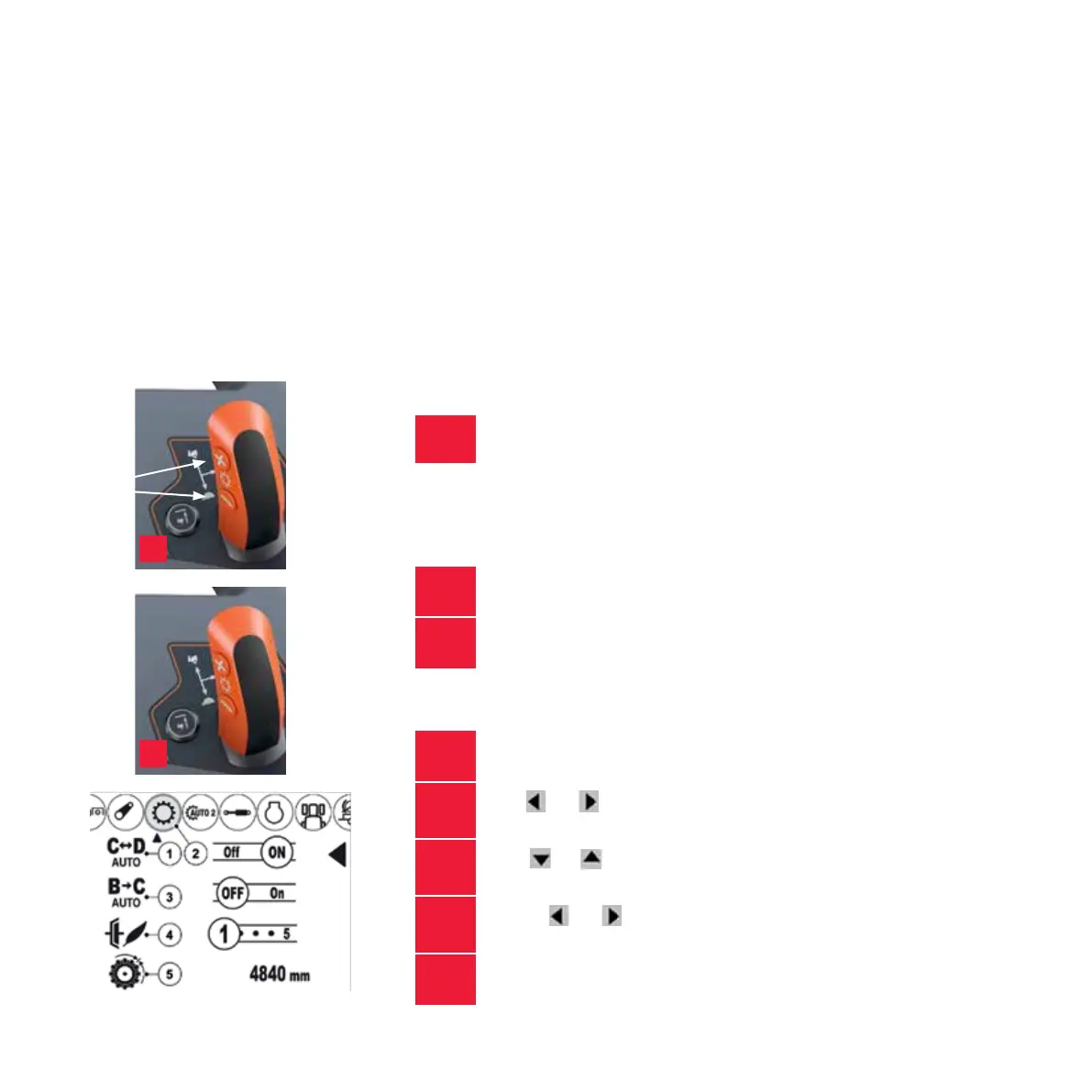
Simply push + or - button located on gear lever or
use the lower rocker switch on the basic handle.
2.
Go to range A; Press the clutch pedal fully down and
keep it down. Speed must be 0. Press the minus button.
3.
See engaged range from the dash
1.
Push on dash control panel ARROW RIGHT once
2.
Push
OR to get to
TRANSMISSION screen
3.
Press
(or ) to get on right line to adjust,
Note that transmission screen has 2 pages - press OK
4.
Set with
OR to set automatic change ON or OFF C < > D
and B > C can be set separately
5.
Push OK to quit editing
Tip Try using instant fuel monitoring to see which range
works best for the task in hand.
1
2
HOW TO
SELECT SPEED RANGE
Selecting the correct speed range for the task
means that the tractor will perform best of its ability.
TO CHANGE RANGE
These processes can also be conducted whilst moving.
CREEPER RANGE SELECTION
SELECTING AUTOMATIC SPEED RANGE CHANGE
7
G Series Quick Start Guide / Active & HiTech



 To Next Page