4
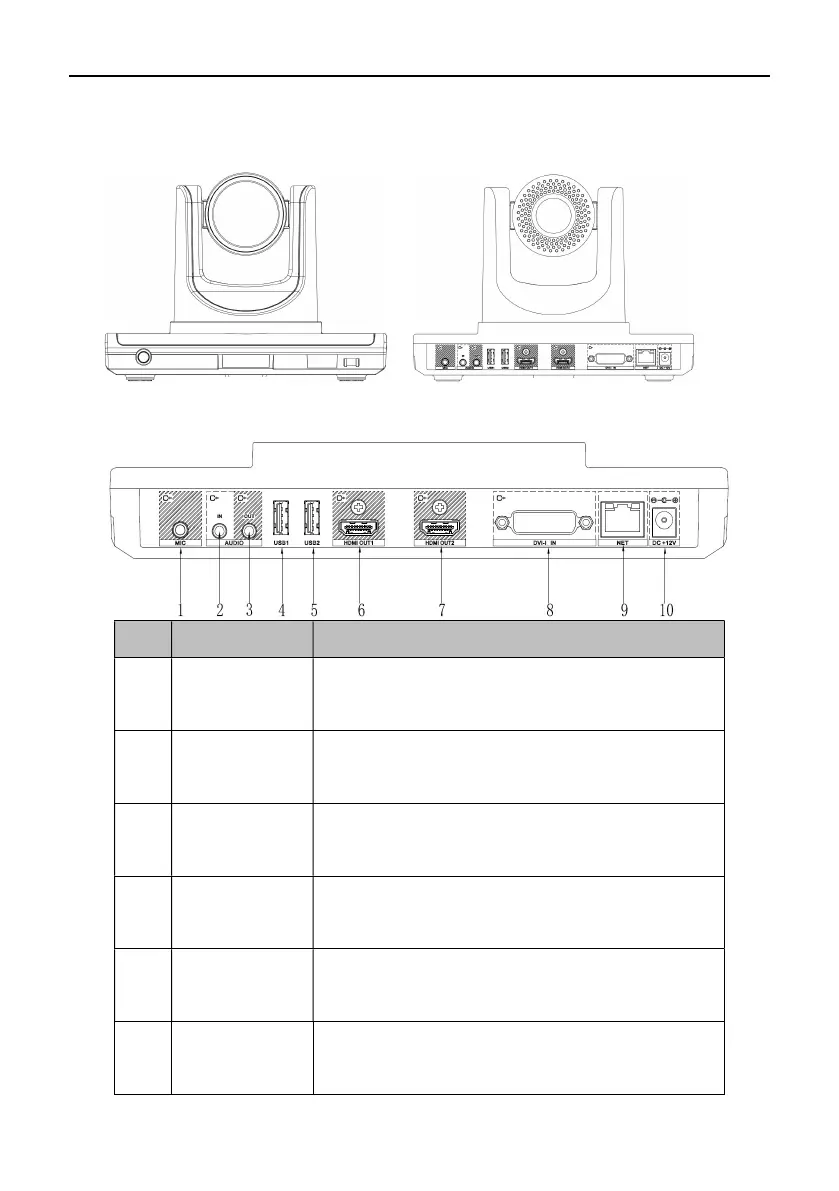
Appearance
No. Interface Function
1 MIC Plug a microphone into the microphone connector to
receive audios.
2
AUDIO IN
3.5mm headphone jack for audio input and audio reception
via connection to PC and cellphones.
3 AUDIO OUT
3.5mm headphone jack for audio output by connecting
audio devices into AUDIO OUT connector.
4 USB1 Connection to external USB devices such as USB drive,
mouse and keyboard, etc. for upgrades and controls.
5 USB2 Connection to external USB devices such as USB drive,
mouse and keyboard, etc. for upgrades and controls.
6 HDMI OUT1
Use HDMI cable to connect HD TV set to HDMI OUT1 (also
with audio output)
Front View
Rear View



 To Next Page