ValueHD Corporation
49
Real time monitoring: displaying video image
Parameter setup: with function buttons
1.2 Video viewing window
Video viewing window must be same as video resolution, the bigger the resolution is, the bigger the playing
area is. Double click viewing window, will show full-screen, double click again, will return to initialized size.
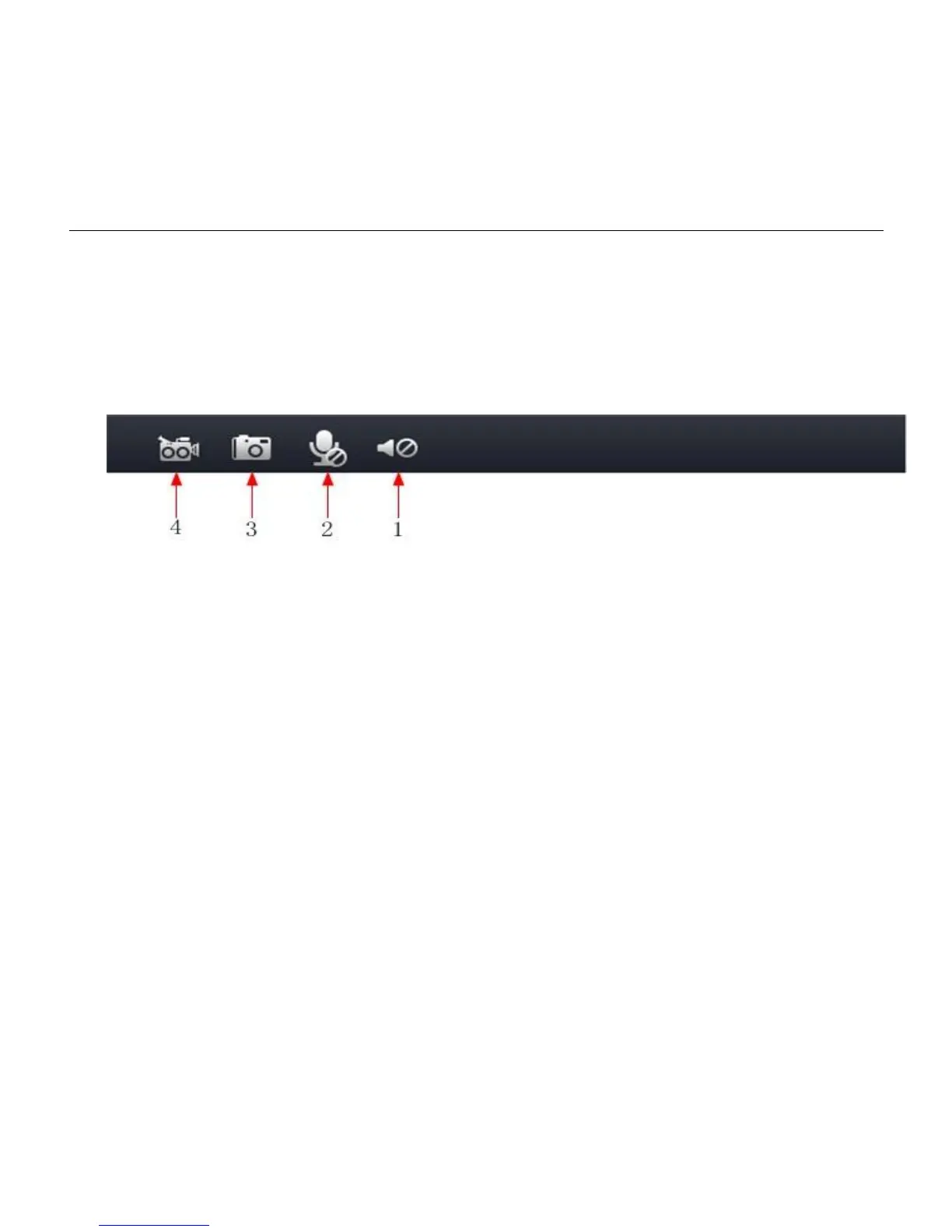
Status bar in viewing window shown as below
1) Audio play button: click to play sound out, click again to turn off.
2) Audio transmit button: transmit sound collected by computer to device, and play out by audio part
connected to the device, click again to turn off.
3) Picture storage rout selection.
4) Video storage rout selection.
1.3 Viewing/Monitoring
Monitoring viewing window size can be adjusted as: 1080P(1920x1080),720P(1280x720)(640x360)
(320x180)4 types, main code stream can be selectable, auxiliary code stream can monitor the image.
1.4 Screenshot
Click screenshot button, the playing video can be stored as image in preset rout.
1.5 Recording
Click recording button, can transmit video and audio stream to the local computer (preset rout).When
recording video, the state bar will show recording state, click the button again, stop recording.


 To Next Page