ValueHD Corporation
31
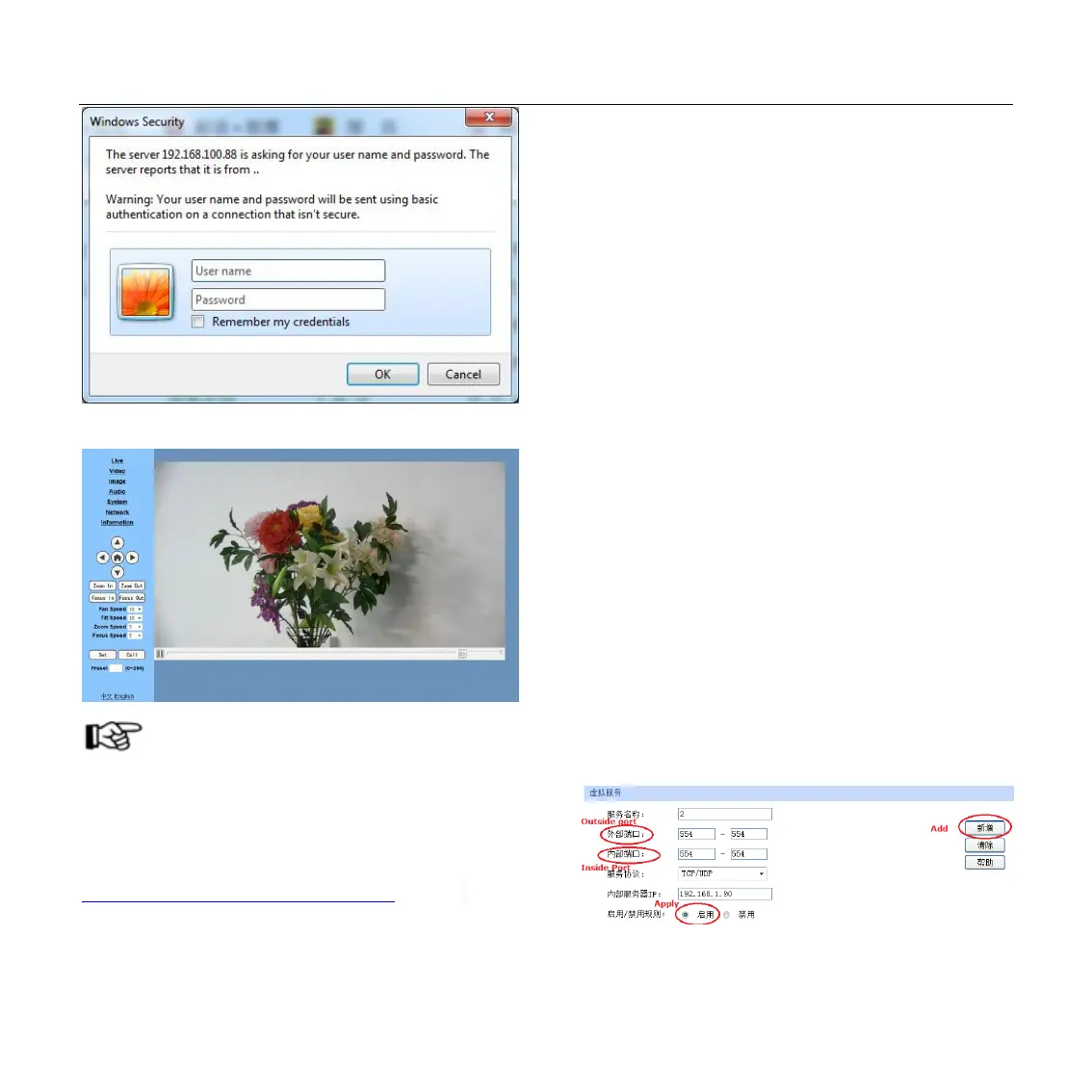
After login, shown as below:
NOTE!
If user first time use this camera by internet
(only for new user), must install a player software
(VLC). Please go to VLC webside
http://www.videolan.org/vlc,download and Install
VLC (player software). After installation, login
again,will show as above:
5 IP Camera accessed/controlled by
WAN (internet)
5.1 Setup IPC accessed/controlled by dynamic
DNS
2 dynamic DNS available:
Dyndns.org,
3322.org
Router Port Mapping:
Take TP-LINK router for example, enter Router
Home Page (interface page),select “Transit control”-
“ Transit rule"--"Virtual server"-- “Virtual
service” ,add a new port number in “Outside
Port” ,add a new port number in “inside port”, put
camera IP address to “IP address”, then select
“Apply” and “Add”, shown as below: (sorry, we do
not have English Version TP-Link here, so put the
Chinese Version picture for reference, the position is
the same)


 To Next Page