22
You can lose control of the vehicle if you
try to adjust a driver seat while the
vehicle is moving. Adjust the driver seat
only when the vehicle is not moving.
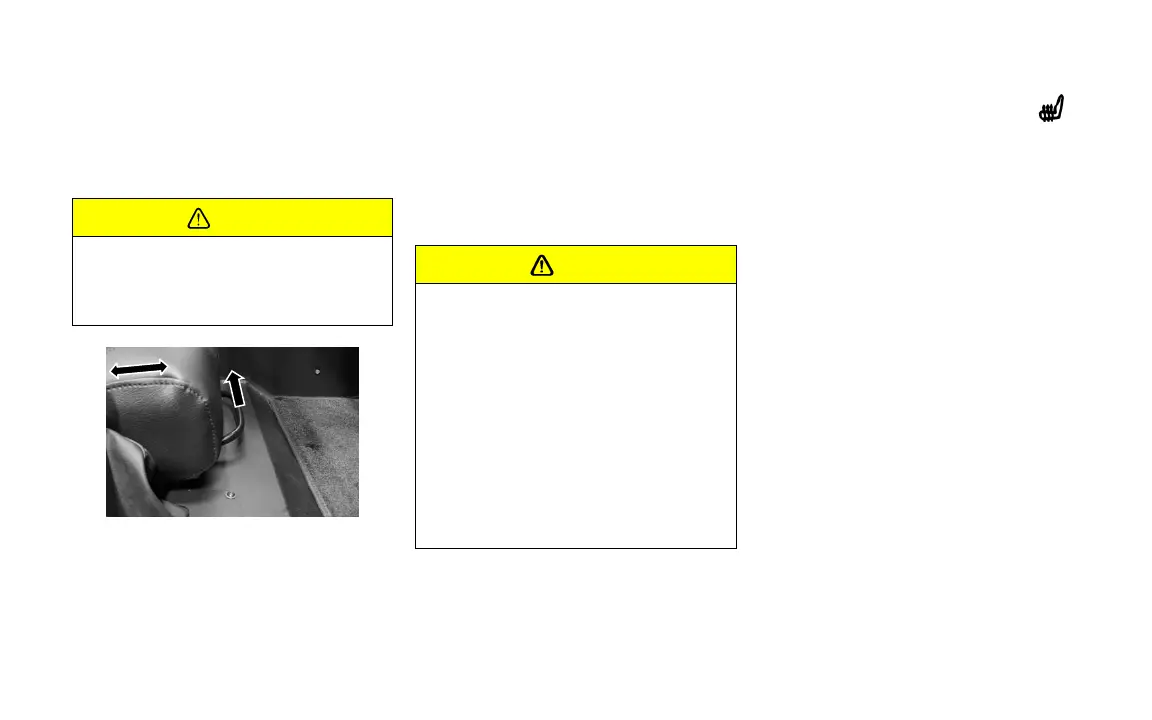
To adjust the seat:
1. Pull up on the handle at the front of the
seat.
2. Slide the seat to the desired position and
release the handle.
3. Try to move the seat back and forth to be
sure it is locked in place.
Heated Seats
If you cannot feel temperature change
or pain to the skin, the seat heater may
cause burns. To reduce the risk of burns,
people with such a condition should use
care when using the seat heater,
especially for long periods of time. Do
not place anything on the seat that
insulates against heat, such as a blanket,
cushion, cover, or similar item. This may
cause the seat heater to overheat. An
overheated seat heater may cause a
burn or may damage the seat.
To Turn on the heated seats press the
button. Three lights will appear on the
button indicating the heater is on High
Press a second time 2 lights will appear on
the button indicating Medium heat
Pressing the button a third time 1 light will
be illuminated indicating Low heat
Pressing the button a fourth time will turn
the Heated seats off


 To Next Page