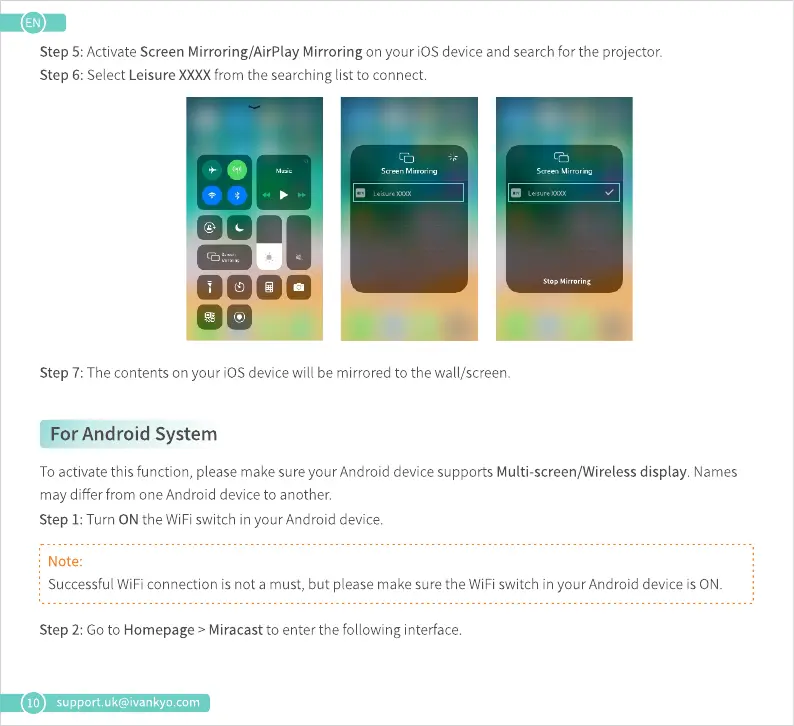
Step 5:ActivateScreenMirroring/AirPlay Mirroring on your iOSdeviceand searchfor the projector.
Step 6: SelectLeisureXXXXfrom the searchinglist to connect.
Scren Mir orinq
Stop Mirroring
0000
oo
10
Step 7: The contents on your iOSdevice will be mirrored to the wall/screen.
For Android System
To activate this function, please make sure your Android device supports Multi-screen/Wireless display. Names
may differ from one Android device to another.
Step 1: Turn ON the WiFi switch in your Android device.
Note:
Successful WiFi connection is not a must, but please make sure the WiFi switch in your Android device is ON.
Step2: Goto Homepage> Miracastto enter the following interface.
support.uk@ivankyo.com











 To Next Page