EasyManua.ls Logo

Vantage Point Products VTM - User Manual

Vantage Point Products VTM
10 pages
Print Icon
To Next Page IconTo Next Page
Loading...
thinkvp.com
Screen Size Range:
24 - 47 in.
61 - 119 cm
Max Weight Load - Monitor Mount:
80 lbs / 36 kg
Hole Pattern Range:
VESA® 100 x 100
400 x 400mm
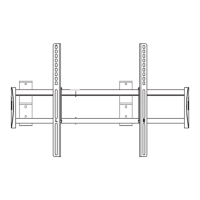
Tilt Mount
rev 11/17/10
Medium
VTM
MEDIANO
Montaje de Inclinación
MOYEN
Penchez le Mont
MITTEL
Neigungsgestell
Question and Answer IconNeed help?

Do you have a question about the Vantage Point Products VTM and is the answer not in the manual?

Summary

Vantage Point Medium Tilt Mount

Product Overview and Specifications

Introduces the product and lists key features like screen size, weight capacity, and VESA compatibility.

Parts List and Mounting Guide

General Installation Instructions

Key safety and usage notes before starting.

Hardware Kits

Assembly Hardware Kit

Details screws and anchors for wall mounting.

TV Mounting Hardware Kit

Details screws for attaching to the TV.

Wood Double Stud Installation

Concrete Installation

Install Monitor Brackets

Install Monitor

Lock Monitor

Tilt Adjust

Security

Install Security Screws

Securing the mount with screws to prevent detachment.

Vantage Point Products VTM Specifications

General IconGeneral
VESA CompatibleYes
MaterialSteel
ColorBlack
TypeFull Motion
VESA CompatibilityUp to 600x400mm

Related product manuals