- 32 -
4.2.10 GPS Automatic Update Time& Date
The GPS automatic correction time setting for the N5 dash cam is turned on
by default. You can select GMT-08:00 by selecting your time zone, such as Los
Angeles. If you do not know the time zone of your location, you can use WiFi
to connect to the Vantrue App, and conrm that the automatic time adjust-
ment function in the APP is turned on.
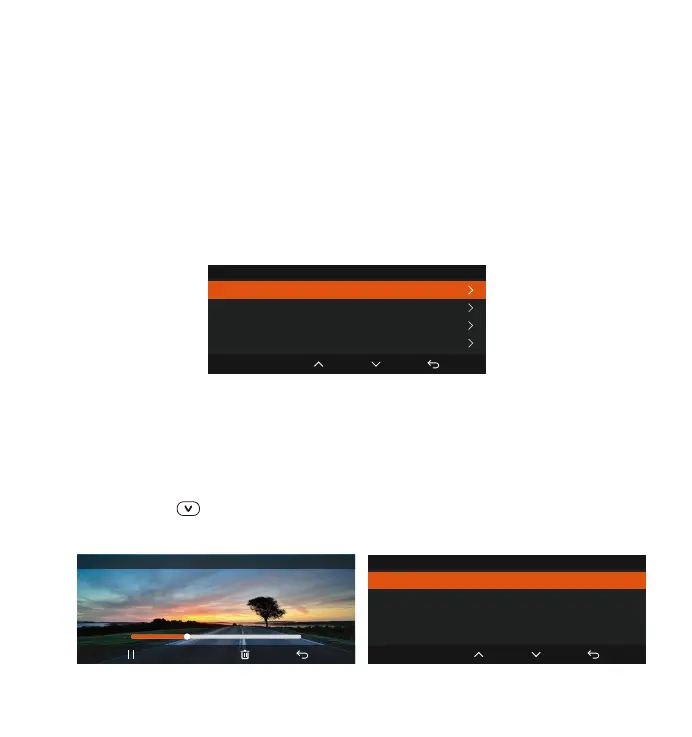
4.2.11 Viewing and Deleting Video/Photos
a.Viewing and Deleting les on the Camera
-Playback Files
After clicking "Files", enter any folder, and after opening the video folder, you
can press the button to select the next le, and delete the le during
playback.
OK
Time & Date
GPS Automatic Update
Set Date/Time Manually
ST/WT Auto Switch
Date Format
20230601_140633_0006_T_C.MP4
00:30 01:07
1X
OK
Event Video
Delete This File?
Delete All Files?
The GPS connection will be completed within 1 minute after you turn on the
device. If the GPS connection is not successful within 1 minute, please check
whether the device has turned on the GPS function, whether the GPS
bracket is properly connected, and whether your environment (underground
parking lot, densely populated residential area, subway, tunnel, etc.)
is aecting the reception of GPS signal.
GPS information is recorded along with the video. To view it, please
download and install the Vantrue APP and Vantrue GPS Player (available for
download at www.vantrue.net).
•



 To Next Page