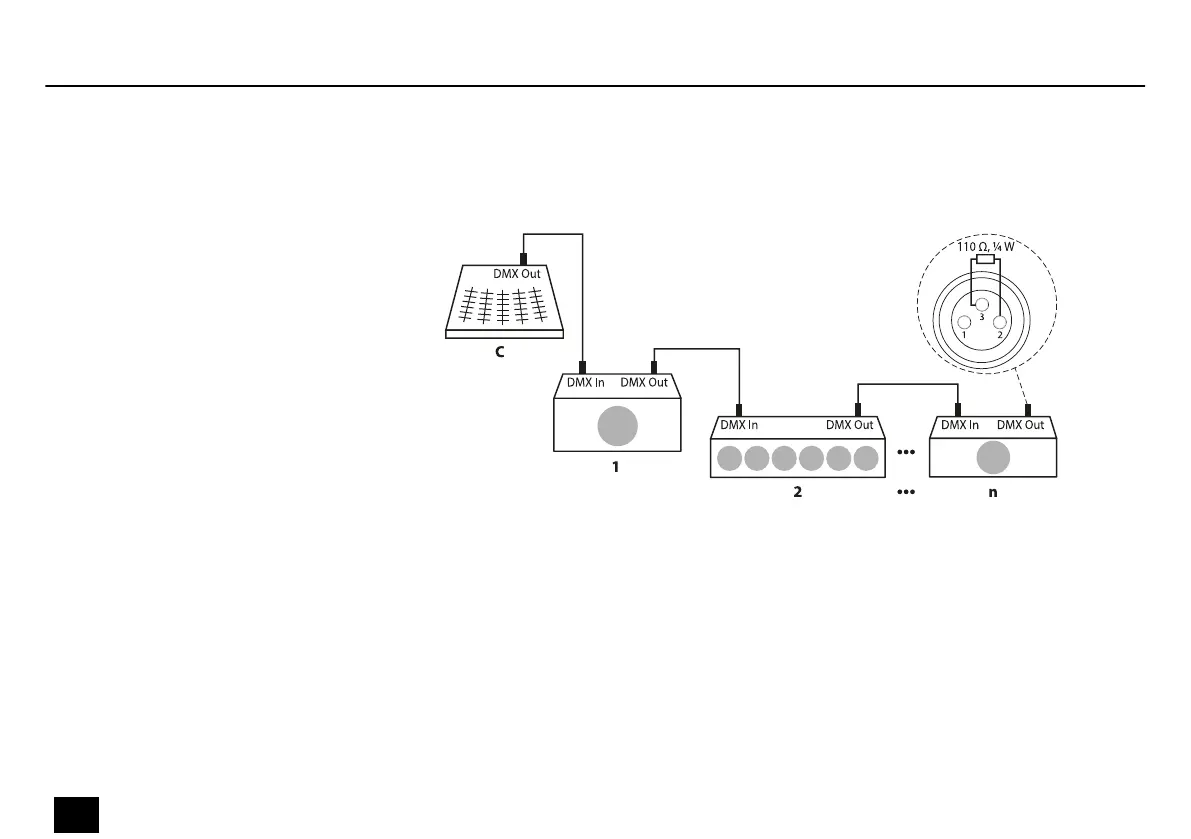
Connect the DMX input of the device to the DMX output of a DMX controller or another DMX
device. Connect the output of the rst DMX device to the input of the second one, and so on
to form a daisy chain. Always ensure that the output of the last DMX device in the daisy chain
is terminated with a resistor (110 Ω, ¼ W).
When you congure a group of devices in master/slave mode, the rst unit will control the
other units for an automatic, sound-activated, synchronized show. This function is ideal when
you want to start a show immediately. Connect the DMX output of the master device to the
DMX input of the rst slave device. Then connect the DMX output of the rst slave device to
the DMX input of the second slave device and so on.
Connections in DMX mode
Connections in master/slave
mode
Starting up
18
Razor Derby
LED Eect








 To Next Page