Home
Vasco
Electronic dictionary
Mini
Page 4 (Operation of the device)
Vasco Mini - Operation of the device
16 pages
Manual
Save Page as PDF
To Next Page
To Next Page
To Previous Page
To Previous Page
Loading...
4
1.
Opera
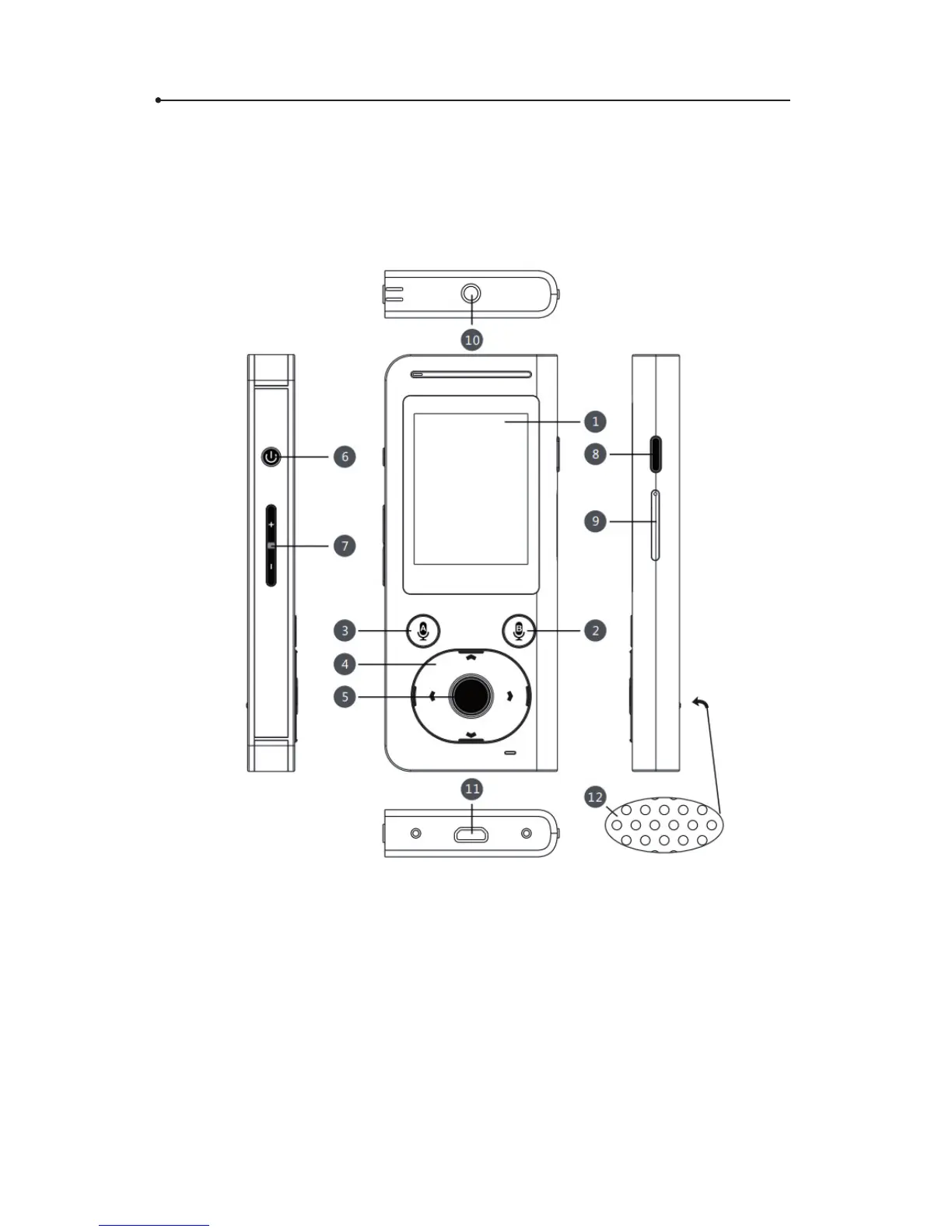
tion of the devic
e
1
. T
ouchscreen
,
2
.
V
oic
e recognition button B
,
3
. V
oice
recognition
button A,
4
. Arro
ws,
5
. Enter
,
6
. P
ower ON/OFF
,
7
.
V
olume Up/Do
wn ,
8
. Back,
9
. SIM card slot,
10
. Earphone input,
11
. Micro USB,
12
. Loudspeaker
3
5
Table of Contents
Main Page
Default Chapter
3
Table of Contents
3
1 Operation of the Device
4
Function Keys
5
Battery Charging
6
In-Built SIM Card
6
Top-Up
6
SIM Card Expiration
6
SIM Card Number
6
First Start
7
2 Vasco Mini
7
Choosing the Source and Target Languages
7
Voice Recognition
8
Pronunciation
8
History
8
3 Menu
9
Clean History
9
Account Balance
9
Device Settings
10
Networks
10
Device
11
About
12
4 Notification Bar
12
Specification
14
Related product manuals
Vasco Translator M3
54 pages
Vasco Mini 2
178 pages


 To Next Page