Need help?
Do you have a question about the Vava VA-SK002 and is the answer not in the manual?
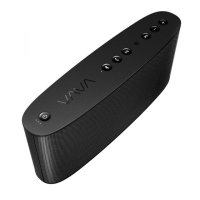
Identifies controls and indicators on the top surface of the speaker.
Identifies ports and connections on the back of the speaker.
Details operations for power on/off and checking battery level.
Explains play/pause, mute, and handling incoming/outgoing calls.
How to adjust volume levels using the dedicated buttons.
Addresses common problems like device not found or connection failure.
Explains why Bluetooth audio might be choppy or drop out.
The VAVA Voom20 Bluetooth® Speaker is a portable audio device designed for wireless music playback and hands-free calling. It offers a robust set of features for both audio enjoyment and convenience, making it suitable for various environments and uses.
At its core, the VAVA Voom20 functions as a Bluetooth speaker, allowing users to stream audio wirelessly from compatible devices such as smartphones, tablets, and computers. It supports Bluetooth V4.0+EDR and various profiles including A2DP, AVRCP, HSP, HFP, and AAC, ensuring broad compatibility and high-quality audio transmission. The speaker is equipped with two 2-inch full-range drivers, delivering a rich and clear sound experience.
Beyond Bluetooth, the Voom20 also offers an AUX input, enabling wired connections to audio sources that may not have Bluetooth capabilities. This versatility ensures that users can enjoy their music regardless of the source device.
A notable feature of the VAVA Voom20 is its built-in microphone, which facilitates hands-free calling. When connected to a smartphone, users can answer, reject, or hang up calls directly from the speaker, making it a convenient tool for communication while on the go or in a group setting. The microphone is omni-directional, designed to pick up sound from all directions.
The speaker also includes a USB output port (5V/1A), allowing it to function as a power bank for charging smartphones or other small USB-powered devices. This adds a practical utility, especially when away from power outlets.
For quick and easy pairing, the Voom20 supports NFC (Near Field Communication). Users with NFC-enabled devices can simply tap their device against the speaker's NFC zone to establish a Bluetooth connection instantly, bypassing the traditional manual pairing process.
The VAVA Voom20 is designed with user-friendly controls for intuitive operation. The top panel features several buttons:
The speaker's ability to pair with two devices simultaneously enhances its flexibility. This allows users to switch between two connected audio sources without needing to re-enter pairing mode, simply by pausing music on one device and starting playback on the other.
The Voom20 is also built with an IPX5 waterproof rating, meaning it can withstand splashes of water from any direction. This makes it suitable for outdoor use, by the pool, or in other environments where it might be exposed to moisture, though it should not be submerged.
To ensure the longevity and optimal performance of the VAVA Voom20, several maintenance guidelines are provided:
By following these guidelines, users can maintain the VAVA Voom20 Bluetooth Speaker in good condition and enjoy its features for an extended period.
 General
| Model | VA-SK002 |
|---|---|
| Type | Portable Bluetooth Speaker |
| Output Power | 20W |
| Playtime | 24 hours |
| Bluetooth Version | 5.0 |
| Water Resistance | IPX7 |
| Waterproof | Yes |
| Brand | Vava |
| Total Power Output | 20W |
| Frequency Response | 80Hz - 20kHz |
| Connectivity | Bluetooth, Aux |
| Color | Black |
| Channels | 2 |
| Bluetooth Range | 33 feet (10 meters) |
| Weight | 1.3 lbs |

 To Next Page