www.vax.co.uk
6
dirt container & filters
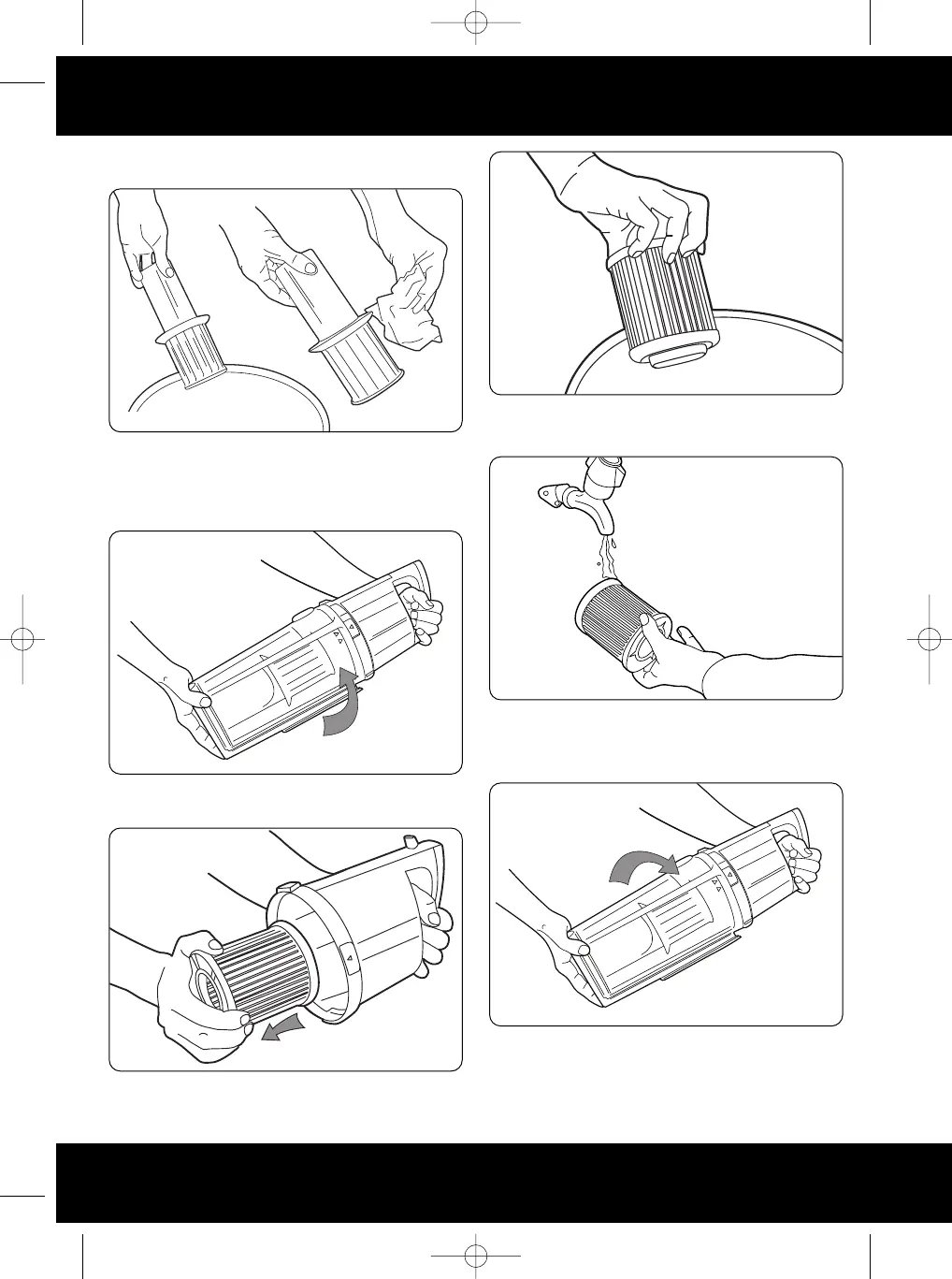
Tap director on inside of rubbish bin to remove excess dust
then wipe with a cloth to fully clean (Fig.5/4).
Once the director is clean and dry, insert back into dust bin
and twist anti-clockwise to lock in place.
To clean filter, remove dirt container lid twist anticlockwise
and pull off (Fig.5/5).
The filter is found inside the lid. Twist the filter
anticlockwise and pull out to remove (Fig.5/6).
Tap filter on inside in bin t
o r
emo
v
e excess dust (Fig.5/7).
To clean, wash under running cold water (Fig.5/8). Allow
24 hours to dry before replacing in the cleaner.
Insert filter back into lid and turn clockwise to lock into
place. Re-attach lid by placing onto dirt container and
turning clockwise until it clicks (Fig.5/9). Return dirt
container to cleaner.
Fig.5/4
Fig.5/5
Fig.5/6
Fig.5/7
Fig.5/8
Fig.5/9
Vax V-049 User Guide.qxd 28/11/06 15:04 Page 6



 To Next Page