GENERAL
MAINTENANCE
14
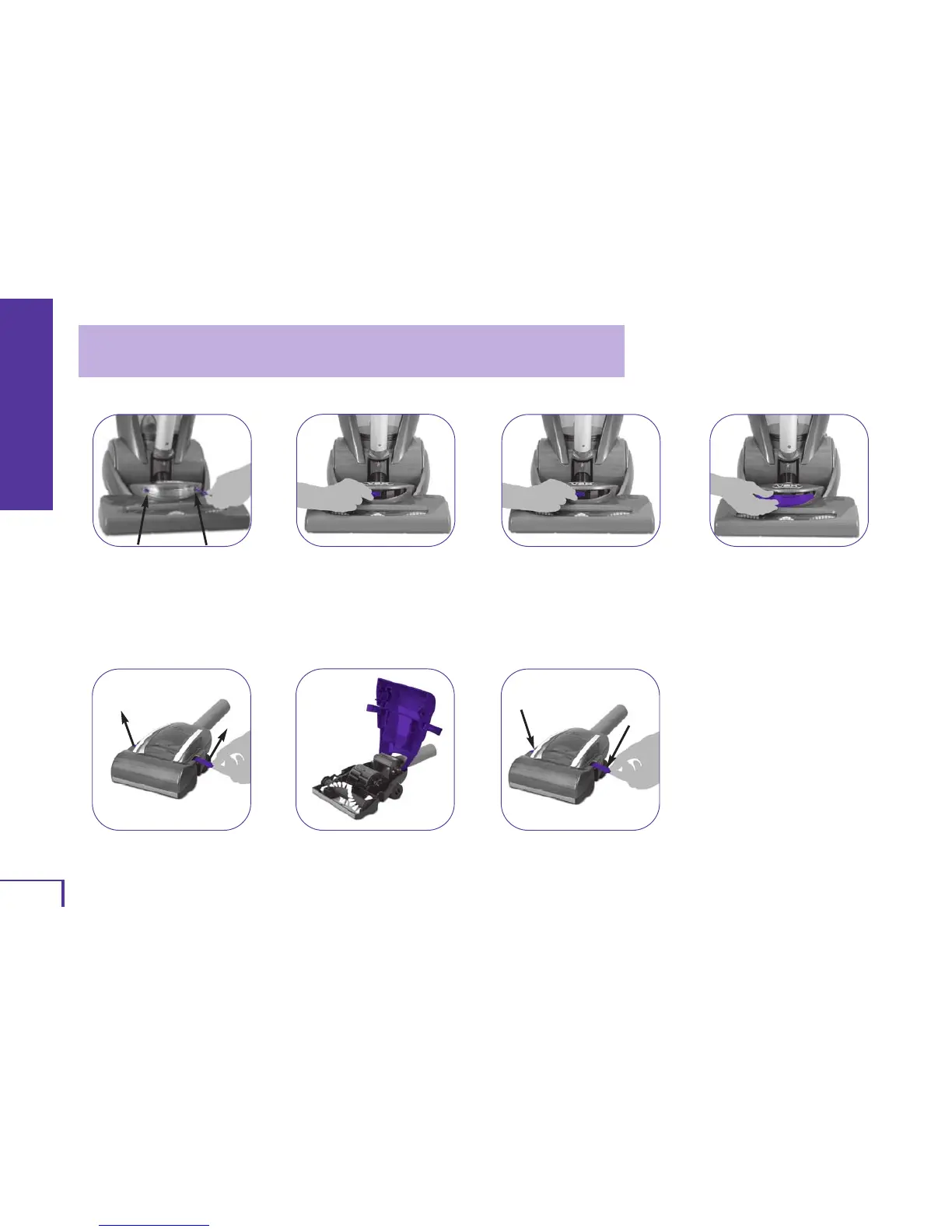
CHANGING THE LIGHT BULB
1.
Make sure vacuum has been
switched off and unplugged
before changing light bulb.Also,
allow the light bulb to cool.
Remove the two screws and
remove the light cover.
Remove the burned out light
bulb and pull it from the socket.
Insert the new bulb.
2.
3.
Attach the light cover using
both screws.
4.
DEBRIS REMOVAL / TURBO TOOL
1.
Remove Turbo Tool from end of
suction hose. Unsnap locking
tabs on both sides of Turbo Tool.
Flip the top cover up and
remove obstruction.
To reassemble, close top cover
of Turbo Tool and snap both
locking tabs into place.
2.
3.
WARNING: TO REDUCE THE RISK OF ELECTRIC SHOCK, UNPLUG CLEANER BEFORE SERVICING.
NOTE: This cleaner uses a common automotive lamp #906, 13.0 volts. For bulb replacement call 1-877-VAX-USA-9
(1-877-829-8729) or visit our website at www.vaxusa.com to locate a dealer nearest you.



 To Next Page