26
MACHINE SWITCHING ON/OFF PROGRAMMING
· Thanks to this function, the user is able to program the automatic turning on and off of the
machine by deciding the days and time slots.
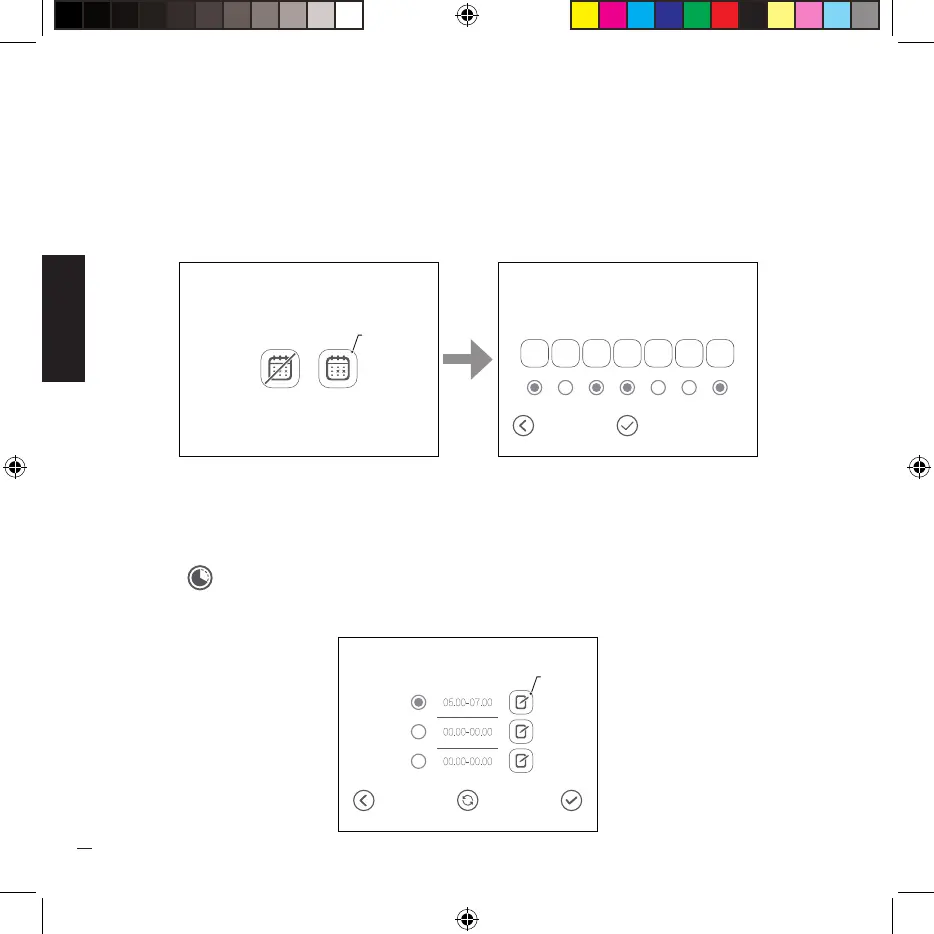
· Press the icon (A) to access the automatic on/off programming menu.
· Select the days of the week in which you want the machine to turn on automatically; the
numbers 1 to 7 correspond to the days of a week, 1=Monday ..... 7=Sunday.
· For each day it is possible to set up to 3 different time bands, on the days when a time band
is not enabled, the standby of that day is kept. If a time slot is enabled, the day is automatically
enabled.
· Set all the desired time bands by pressing the icon (B), once programming is complete, the
symbol ( ) appears on the “HOME” screen at the bottom right to indicate that automatic on
and off of the machine is active.
On /Off
mode
Program
Manual
A
Programming
1
2
3
4 5 6
7
Apply
Monday
Synchronize
B


 To Next Page