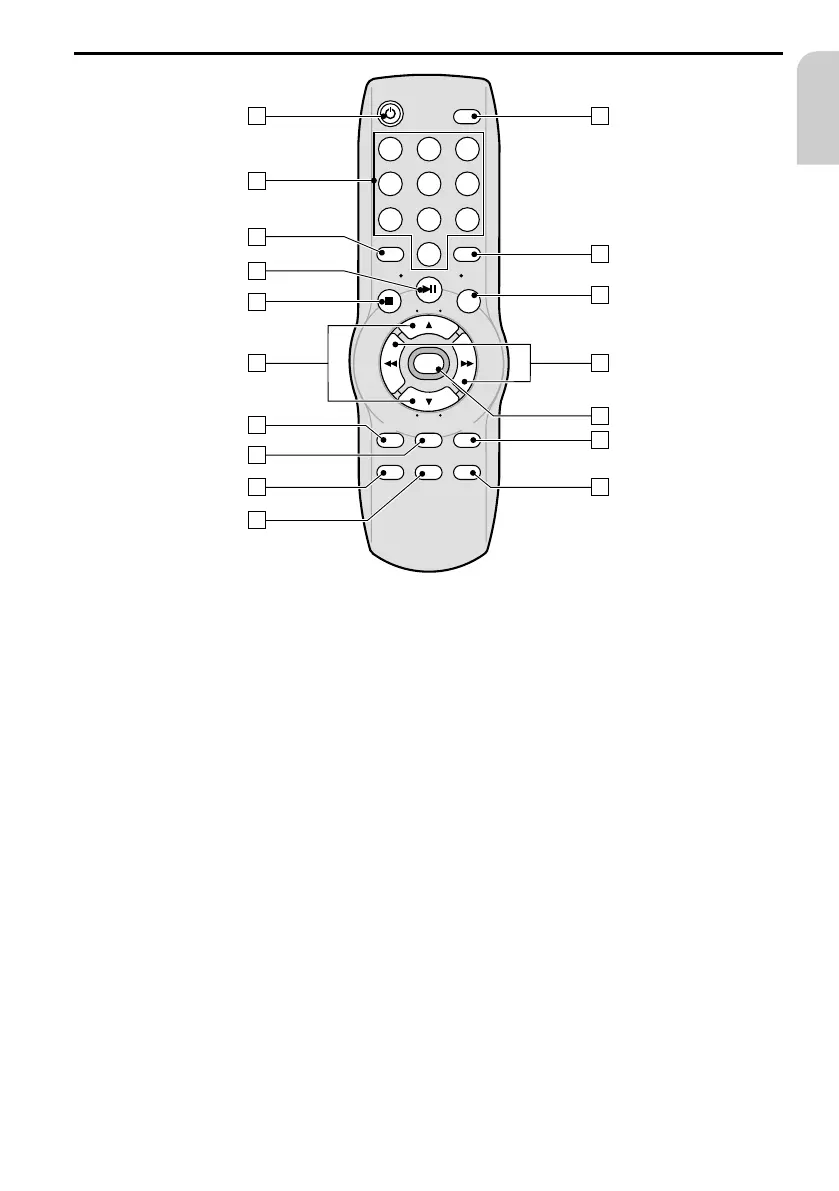
1 O POWER . . . Switch the DVD player ON / OFF
2 0 - 9 . . . . . . . . Numeric key buttons
3 GOTO . . . . . . . Adjust the VFD Display brightness level
. . . . . . . . . . . . During playback: GOTO mode
4 P . . . . . . . . . Start playback, Pause (still picture)
5 S . . . . . . . . . . Stop playback
6 8 / 2. . . . . . . DVD: Next / previous chapter
. . . . . . . . . . . . VCD/CD/MP3: Next / previous track
. . . . . . . . . . . . In MENU mode: move the cursor up/down
7 SUBTITLE . . . . Select the SUBTITLE language (depending on the DVD disc)
8 AUDIO . . . . . . Select the audio soundtrack (depending on the DVD disc)
9 SETUP . . . . . . Display the SETUP menu of the DVD player
0 TITLE . . . . . . . Display the DVD title menu (depending on the DVD disc)
q MENU . . . . . . Display the DVD root menu of the DVD disc
w ANGLE . . . . . . Select the viewing angle (depending on the DVD disc)
e ENTER . . . . . . Confirm a selection
r < / > . . . . . Start fast forward / fast reverse
. . . . . . . . . . . . In MENU mode: move the cursor left/right
t SLOW . . . . . . . Switch slow motion playback on / off
z REPEAT . . . . . Switch on and select Repeat mode
u DISPLAY . . . . Display time information (during playback)
REMOTE CONTROL
17
English
POWER
1
4
7
2
5
8
0
3
6
9
REPEAT
D
I
S
C
C
O
N
T
R
O
L
SLOW
SKIP
SKIP
AUDIO
TITLE
SUBTITLE
SETUP
ANGLE
MENU
ENTERREW FF
GOTO
DISPLAY
1
17
16
15
14
13
2
5
7
9 11
12
10
6
3
4
8



 To Next Page