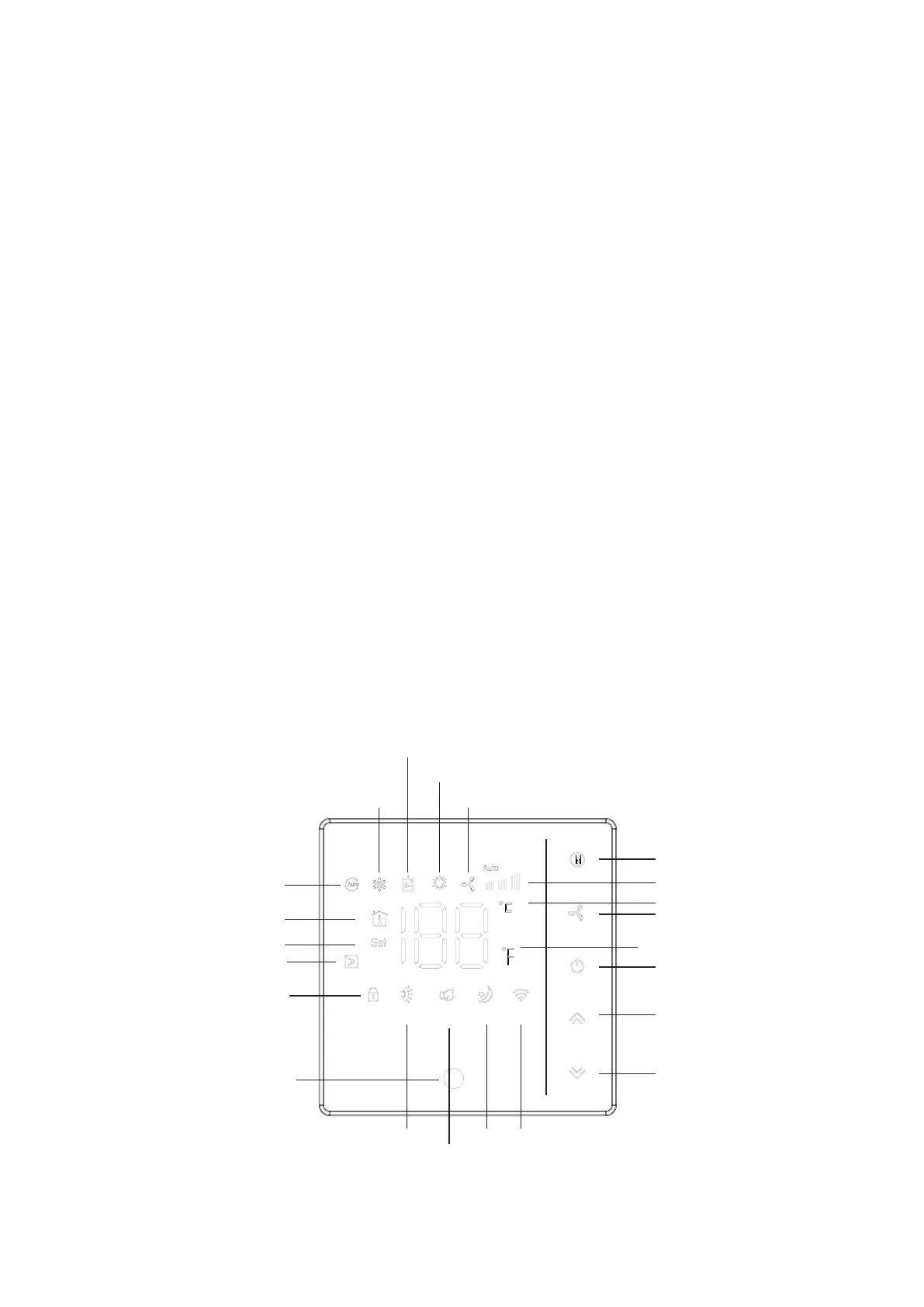
1.6 DESCRIPTION OF THE WALL PAD DISPLAY
1. Mode key (M)
(1) Press the mode key briefly to switch the thermostat mode, automatic mode, cool mode and
dehumidify mode, fan mode, heat pump mode.
(2) Press and hold the mode key to enter the special mode option. There are four special modes,
including Fan switch, sleep switch, Electric auxiliary heat switch, Light switch, the above
four items are switch by short press after entering special mode. After turning on the sleep
mode, the fan is switched on switch to low speed. In which sleep cannot be started in fan mode
and dehumidify mode;
2. FAN (fan)
Press the fan key briefly to switch the fan speed, automatic, high speed, medium speed wind and
low speed. The electric auxiliary heat switch can only be turned on in heating mode(refer to
infrared remote control).
3.Turn on the key (POWER)
Press the switch button briefly to switch the switch state.
4. UP key (up)
Press short to increase the set temperature and increase the values of other options.
5. DOWN key (down)
Short press to reduce the set temperature and other options.
6. Child Lock Button(UP+DOWN)
Press the up key and the down key for a long time to open the child lock state. In this mode, the keys
are invalid. Press and hold the up and down keys once again to cancel the child lock state.
7. WIFI connection (down button in shutdown state)
Press the down key for a long time in the off state to enter the WiFi connecting.
WiFi
Cool mode
Dehumidify mode
Heat pump mode
Fan mode
Mode
Fan speed
Degree Celsius
Fan
Fahrenheit
Power on/off
Up
Down
(WiFi pairing)
Sleep
Lighting
(standby)
Pendulum
leaf
Infrared
receiver
Lock
Electric
auxiliary heat
Set Temp.
Room Temp.
Auto mode


 To Next Page