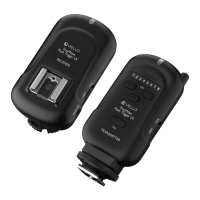
1. With your hot-shoe flash unit
turned o, switch the flash’s locking
switch to the unlock position.
2. Insert the hot-shoe flash’s hot-shoe foot
into the receiver’s hot-shoe mount.
3. Switch the hot-shoe flash’s locking
switch to the locked position to
secure it to the receiver.
4. Turn on the hot-shoe flash and
the Flash Trigger LR Receiver.
5. Set the same channel on the
transmitter and receiver units.
6. Confirm that your camera, transmitter,
receiver, and hot-shoe flash are all
powered on.
7. Fully press the shutter button on
your camera to capture an image. All
lights connected to receivers in the
currently selected channel will fire
simultaneously. If you selected “ALL”
channels on the transmitter, then all
receivers (regardless of their channel
selection) will fire simultaneously.
8. The transmitter and receiver LED
confirmation lights will illuminate red.
CONNECTING THE RECEIVER TO A HOT-SHOE FLASH
14



 To Next Page