7
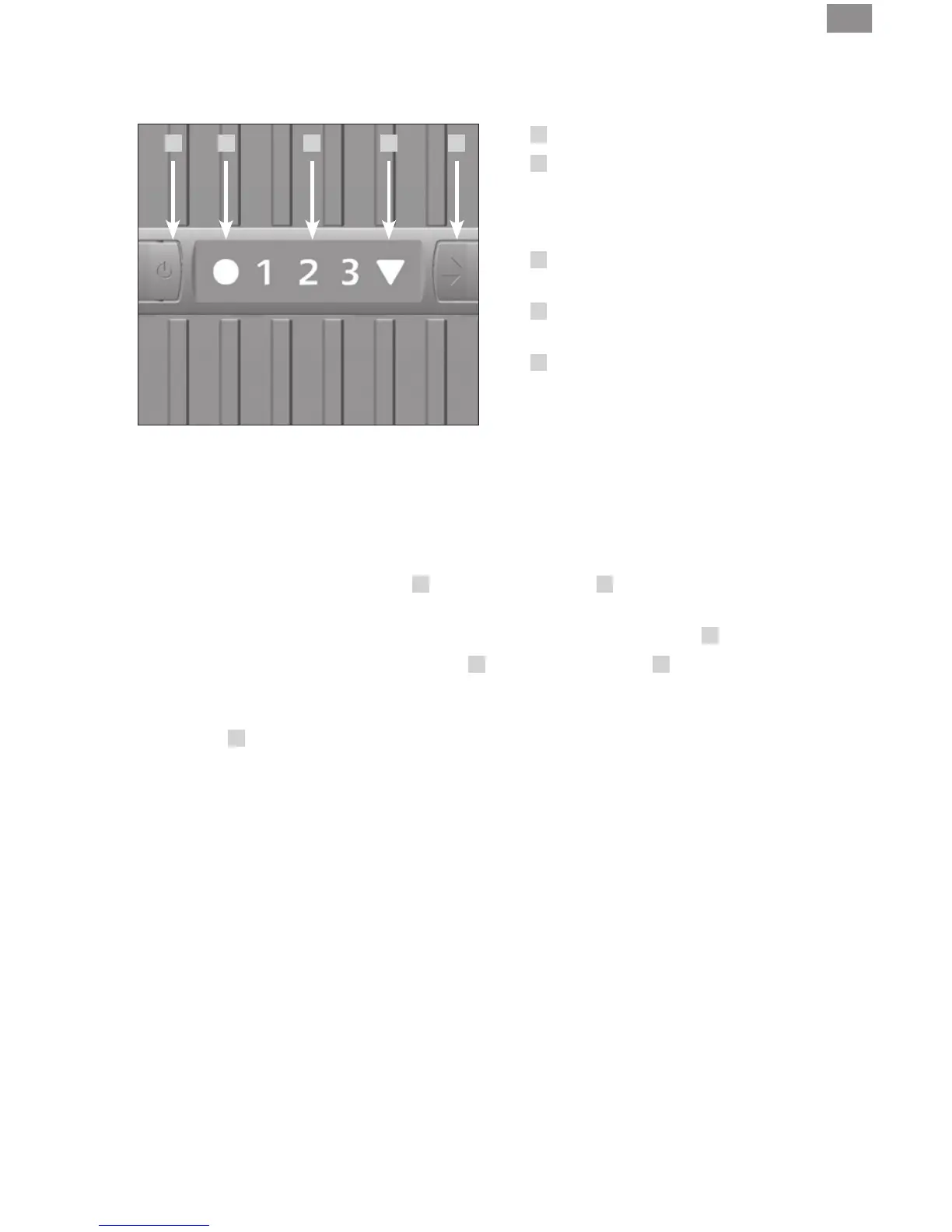
OPERATOR PANEL
1
ON / OFF button
2
Operation indication ON / OFF
Continuous lighting: ON
No lighting: OFF
Flashing: Fault (see Eliminating faults)
3
Fan stage display 1/2 (LW 15),
1/2/3 (LW 25/45)
4
Automatic shut-off display
(see“Automaticshut-off”)
5
Fan stage selector button
1/2 (LW 15), 1/2 /3 (LW 25/45)
DAILY USE AND OPERATION
• Switch on the appliance with button
1
. The operation display
2
lights up. The fan rotates on
its lowest setting.
• Select required fan stage 1/2 (LW 15), 1/2 /3 (LW 25/45) with selector button
5
.
• To switch the appliance off press the button
1
. The operation display
2
stops lighting. Al-
though the motor is shut off, the fan blades may continue to rotate for a short period of time.
• The Venta Airwasher has a built in, automatic safety shut off switch that is indicated by
displaying
4
. As soon as the upper housing is lifted off the lower housing the motor shuts off
even though the fan blades may continue to rotate for a short period of time.
1 2 3 4 5


 To Next Page