24 EN
Display Function
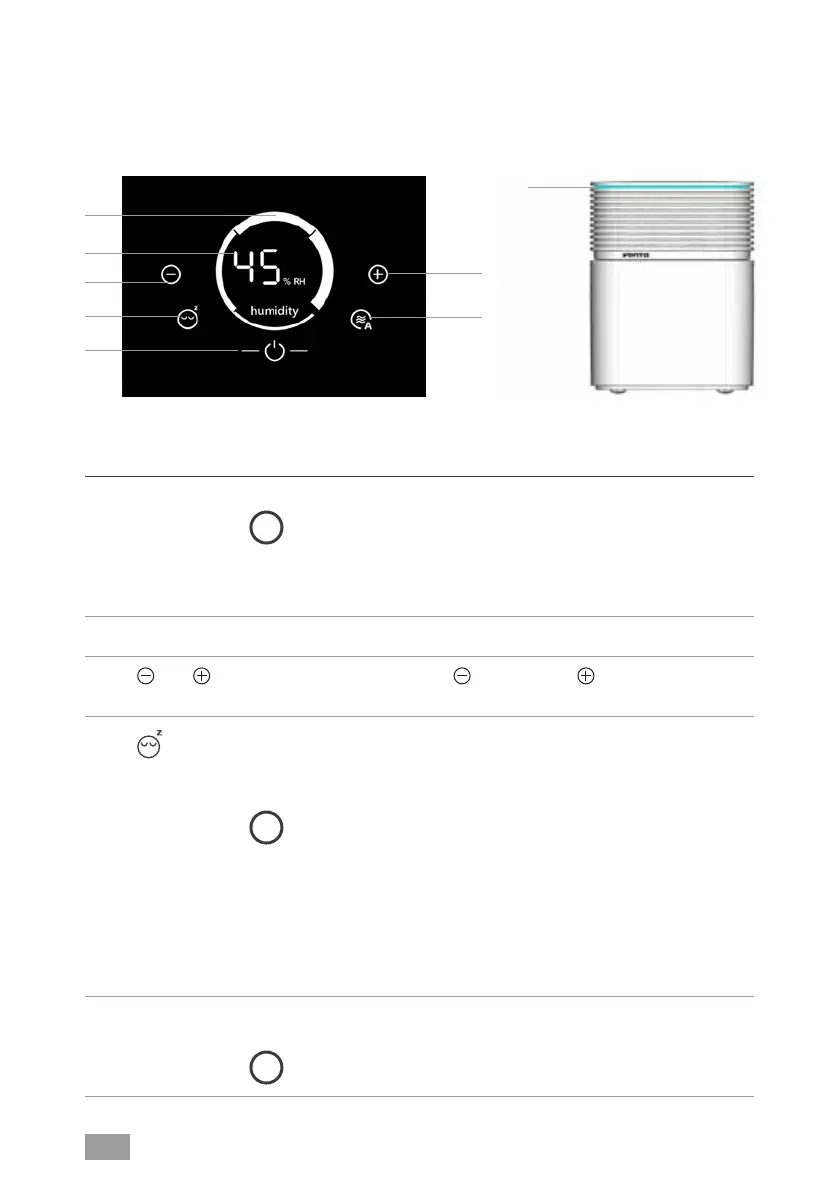
1 Speed Displays speed levels 1 - 2 - 3 - 4.
i
The speeds are represented in the form of ring segments. At a higher
speed, the next ring segment in a clockwise direction becomes
thicker. This starts with Level 1 as a thin ring segment at the bottom and
progresses to Level 4 with the thickest ring segment on the right. The
illustration shows Level 4.
2 Humidity Displays ambient humidity (0 - 99 %).
3
and Set the speed by tapping: reduces and increases the
speed.
4
Tap to switch sleep mode on or off.
ON: Appliance dims the display illumination, reduces the speed
to 1 and switches off LED strip 7.
i
You can change the speed 1 manually using button 3 with + or -.
Automatic operation 6 is not possible. LED strip 7 can not be switched on.
OFF: Display lit up, LED strip 7 switched on and appliance
operates at selected speed 1 - 4.
LED strip 7 does not switch on if it has been separately switched off
previously. Touch and hold the sleep mode button 4 for approx. 3
seconds to switch it on again.
5
Switch the appliance off or on by tapping the power button.
i
The Power button for switching on or off only lights up when the
appliance is plugged in.
DISPLAYS, FUNCTIONS
& SETTINGS
7
2
3
4
5
1
3
6


 To Next Page