13EN
7 Sleep mode OFF / ON
The appliance reduces the fan stage to 1 and dims the dis-
play. You can change the air flow rate manually in sleep mode
at any time.
8 Child lock OFF / ON
Hold for 3 sec. to activate/deactivate the key lock.
9
Tap the
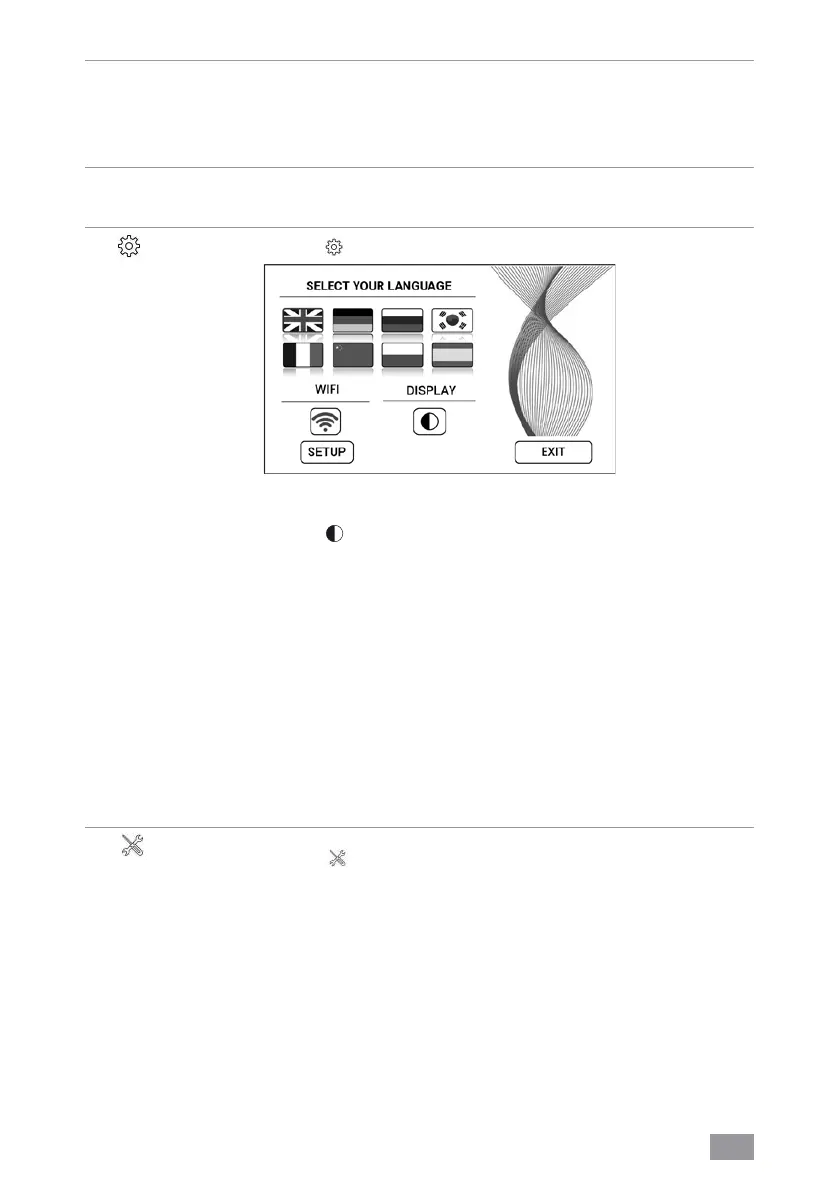
. button to open the Settings menu.
Language
Display
WIFI
SETUP
Tap the national flag to select language.
Tap the
button to select black or white display background
colour.
Display WiFi connection.
Enable or disable WiFi by tapping the
button.
grey: WiFi disabled.
blue: WiFi connection to Venta server enabled
(full access).
green: WiFi connection to the local network established
(local access).
red: No WiFi connection. Set up the WiFi function. For a
precise description, see sections “Configure WiFi” and “Venta
App”.
10
Tap the
button for
instructions and maintenance infor-
mation.
white: No instruction.
red: Observe instruction.
For a precise description, see section “Cleaning & Mainte-
nance”.


 To Next Page