5 EN
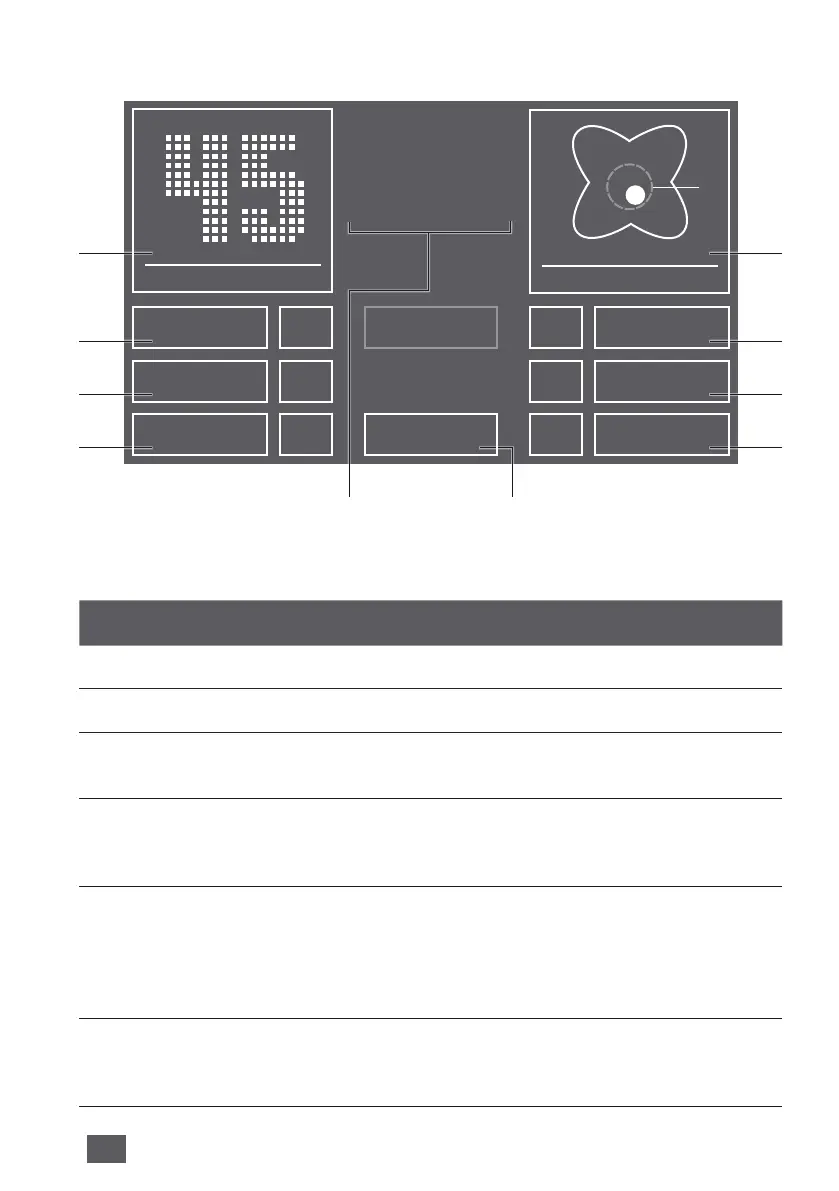
Function Setting
1 Air humidity Display air humidity.
2 Speed Fan stage 1 (weak) – 5 (strong).
3 Humidity 30 - 70 % (in 5 % increments) If the specied humidity is
reached, the disc stack will not turn.
4 Timer OFF / 1 / 3 / 5 / 7 / 9 h (hours)
The appliance shuts o automatically after the preset
hours have expired.
5 Temperature /
Comfort zone
Temperature: Hold for 3 sec. to switch back and forth
between °C and °F.
Comfort zone: If the white dot is moving inside the green
circle, the relative humidity and room temperature will be in
the „comfort zone“ where one can feel comfortable.
6 Auto OFF Appliance operates with preset fan stage 1 – 5.
ON The appliance automatically regulates the fan stages
depending on the air humidity in the room.
FUNCTIONS, SETTINGS & DISPLAYS
The preferred setting can be selected or changed by briey touching the
respective function.
1
2
3
4
5
6
7
8
910
CLEANING
OK
SPEED 3
TIMER 1h
HUMIDITY 50%
AUTOOFF
CHILD LOCKON
SLEEP MODEOFF
HUMIDITY
%
FILL TANK
CHANGE HYGIENE DISC
CLEANING
CLOSE DOOR
COMFORT ZONE
RECOMMENDED
2515
0 50 90%
35°C



 To Next Page