3
Quick Reference Guide Ventana BenchMark GX
II. Label slides
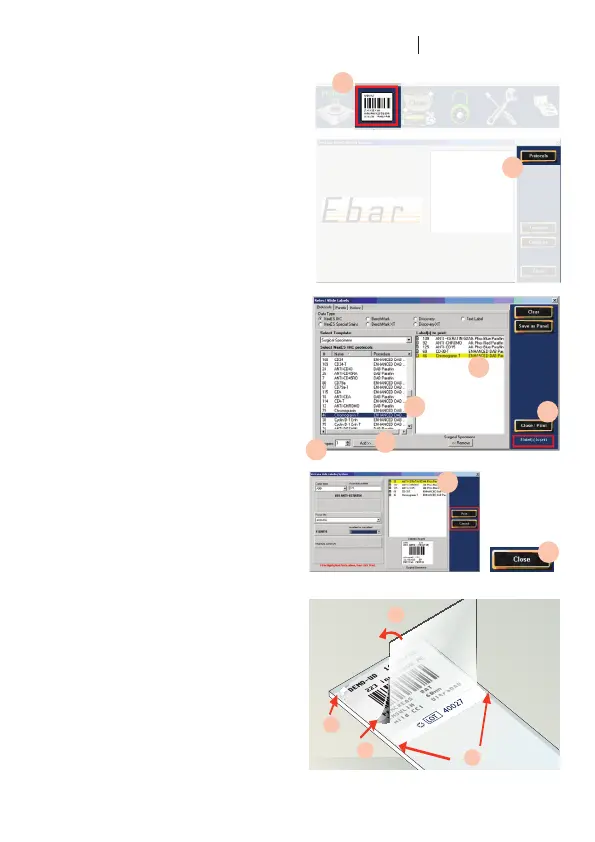
7. Click the slide label icon at the bottom of
the main screen.
8. In the Ventana Slide Labeling System,
click the Protocols icon.
9. In the Select Protocols list, select one or
more protocols. For each protocol
Click the protocol to select it.
10. Enter the number of labels to print in the
Copieseld.
11. Click the Add icon to copy the item to
the Labels to Print list.
12. Click the Close/Print icon.
13. TherstlabelisselectedintheLabels
to Print list. Enter information in the
requiredelds,andthenclickthePrint
icon. Repeat for each label.
14. When all labels are printed, click the
Close icon.
15. Press the Feed icon on the printer to
advance the last label. Pull the label
downward and tear it neatly off the roll.
16. Apply the labels to slides
17. Peel the adhesive backing off the
protectiveap.
18. Foldtheapoverthelabel
19. and smooth it down, then peel the label
off its backing.
20. Center the label on the frosted side of
the slide and smooth it down. The label
should not extend over the edges of
the slide.
7.
9.
10.
11.
11.
12.
8.
13.
14.
19.
17.
20.
18.


 To Next Page
 Loading...