5
Quick Reference Guide Ventana BenchMark GX
IV. Start a Run
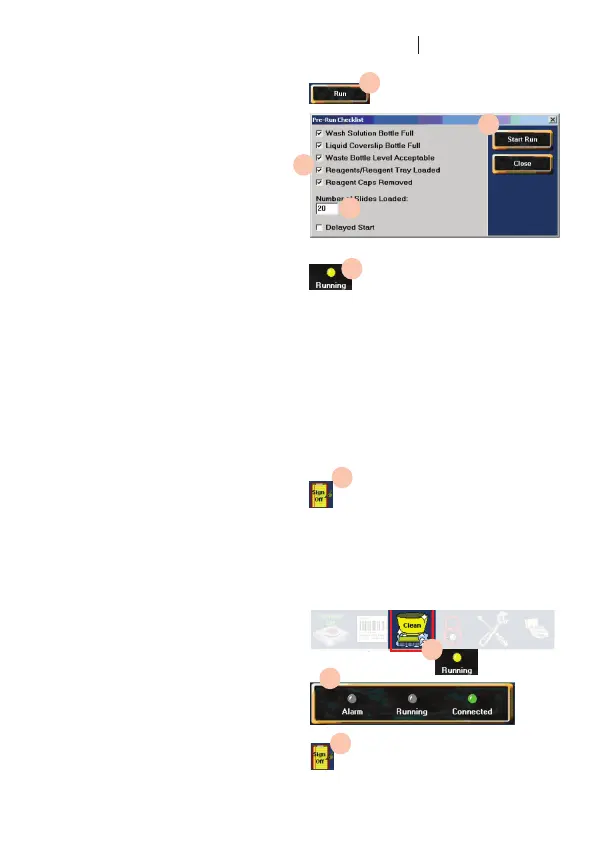
33. At the computer, click the Run icon in
the main screen.
34. In the Pre-Run checklist, click the last
two check boxes and type in the number
of slides loaded.
35. Click the Start Run icon.
36. The Running light becomes yellow.
37. If a manual application is required, the
system will pause and alert the operator.
38. Remove the reagent tray and open the
slide doors.
39. Dispense reagent onto each slide. Hold
the pipette at a 45 degree angle. Insert
the tip so that it penetrates the liquid
puddle on the slide. Dispense gently to
avoid spilling reagent over the edges of
the slide. Take care not to draw liquid
back into the pipette.
40. Close the top slide door, replace the
reagent tray on the carousel, and close
the front slide door, making sure the
tabonthedoortsoverthebaseofthe
reagent tray.
41. Press the Ventana icon on the
instrument control panel to resume
the run.
42. Whentherunisnished,thesystem
alerts the operator and illuminates the
Sign Off icon at the bottom of the main
screen.
43. Remove the completed slides.
44. Click the Sign Off icon.
V. Clean the slide drawer
45. At the main screen, click the Clean icon.
The Running light glows yellow.
46. Wait 10 to 15 minutes. When the process
is completed, the Running light goes
off, the instrument Connected light
becomes green, and the Sign Off icon is
illuminated.
47. Click the Sign Off icon.
33.
34.
34.
35.
36.
44.
46.
47.
48.


 To Next Page
 Loading...