3
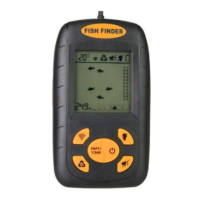
8. Fish Location Indicator
9. Bottom Contour Indicator/Rock Indicator
10. Weed Indicator
11. Water Depth Readout
TURNING ON/OFF AND SIMULATION MODE
1. To turn the Power On, press and hold the Power Key
for 2 seconds.
2. To turn the Power Off, Press and Hold the Power Key
for 3 seconds.
3. During normal operation the screen can be refreshed
by pressing the Power Key. Use this feature if inconsistent
readings are evident.
4. To enter the Simulation Mode hold the Power key
for 5 seconds while the power is off. Release the Power
key once the display turns on. The unit is now in
Simulation Mode and must be turned off to enter normal
operation.
Note: 1. The fish finder has an automatic “power-off”
feature to prevent battery drain if you accidentally leave
the unit on. When the depth display reads “---”
continuously for 5 minutes, the display will shut off
automatically. 2. The monitor must be turned off first to
enter normal operation from simulation mode.
FEATURE SETUP
• Press and Hold the Key for 3 seconds.
• The Sensitivity Indicator ( ) on the screen will blink.
• Press the key again to cycle and select the right
Sensitivity setting for the water.
• Press other features ( , , , ℉&FT/℃&M ) keys


 To Next Page