- E8 -
SETTING THE CLOCK
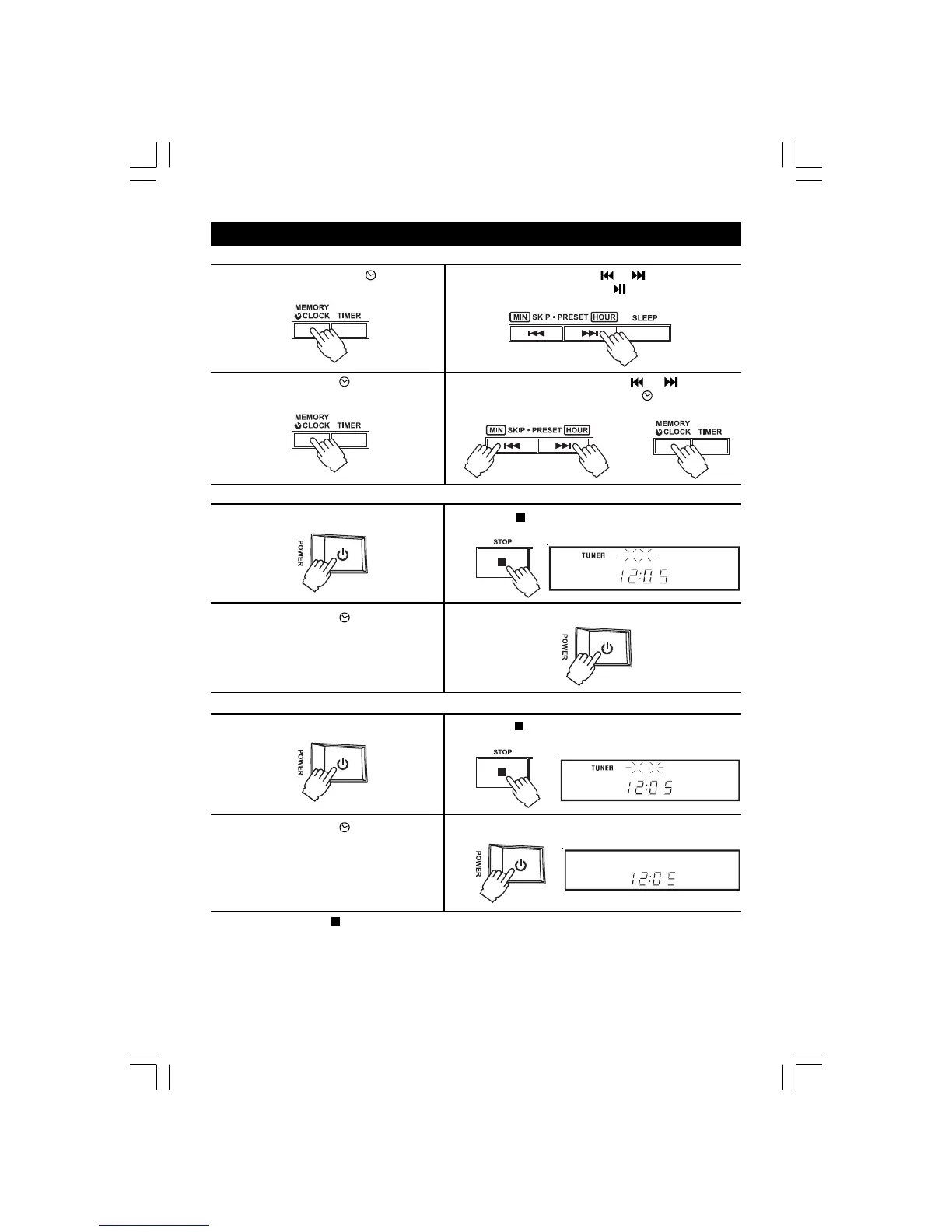
1.Press the MEMORY/ CLOCK
button in clock mode. Hours flash.
2. Press the HOUR button ( or ) repeatedly to set
current hour and press the PLAY/PAUSE repeat-
edly to set the format of time (12 hour/24 hour).
To set the current time (Select POWER STANDBY mode)
3. Press the MEMORY/ CLOCK button
to make the correct minutes flash.
4. Press the MINUTE buttons ( or ) to set the
minutes and press MEMORY/ CLOCK button
again to start the clock.
AND
To set the timer off (time to turn off)
1. Press the POWER button to turn ON the
unit.
2. Press the STOP button until the "TIMER OFF" indicator
shows on the display.
2. Press the STOP button until the "TIMER ON" indicator
shows on the display.
1. Press the POWER button to turn ON the
unit.
4. Press the POWER button to turn OFF the unit.
3. Press the MEMORY/ CLOCK button
in clock mode.
3. Press the MEMORY/ CLOCK button
in clock mode.
4. Press the POWER button to turn OFF the unit.
NOTE : 1) Press the STOP button to view the local time, time to turn on and time to turn off step by
step, the previous display will be retrieved about 5 seconds.
2) The timer will work if the TIMER key is pressed so that "TIMER" lights up in the display.
Cancel the timer by pressing the key so that "TIMER" goes out.
3) Suddenly OFF when playing, the TIMER OFF function is activated. Press the STOP
button until the 'TIMER OFF' indicator show on the display.
repeat the steps of
the setting the current time
repeat the steps of
the setting of current time
To set the timer on (time to turn on)


 To Next Page